Record AP careers guidance and check destinations
Written for: Authorised provision staff, careers leads and destination-check owners.
Record guidance, encounters, work experience or an agreed plan, then review later leaver checks with their sources and dates. It also records later destination checks for leavers. A destination recorded when a placement closes is different from a later checked destination; an unchecked destination is different from a checked result of Not known.
You need the relevant AP careers access and placement scope. Recording and configuration are separate permissions. The examples use fictional Ada Lovelace, Alan Turing and Fictional Oak School. Recorded guidance, a task or a destination category does not establish causation, a successful placement or a guaranteed sustained outcome.
Read the overview and period
Section titled “Read the overview and period”- Open Careers & Destinations.
- Use Overview, Guidance, Follow-up and, where permitted, Settings.
- Read current guidance coverage and the destination report separately. Current guidance coverage counts young people, even when a young person has more than one placement.
- For leaver reporting choose Left in the last 12 months, Left in the last 2 years or Left in the last 3 years. Inspect the resulting closure period before using any count.
- Read the destination at closure independently from the later 1–24-month follow-up intervals. Each closed placement counts once in the destination report, within the placements you can see; it is not necessarily a unique-person count across repeated placements.
- At each interval, keep Reached, recorded categories, Unchecked and Not yet due separate. Unchecked can include a leaver for whom no check was scheduled at that interval. Do not recode it as NEET or Not known.
- A loading or failed workspace read is not a zero result. Use the available retry control and resolve the source/access state before reporting.
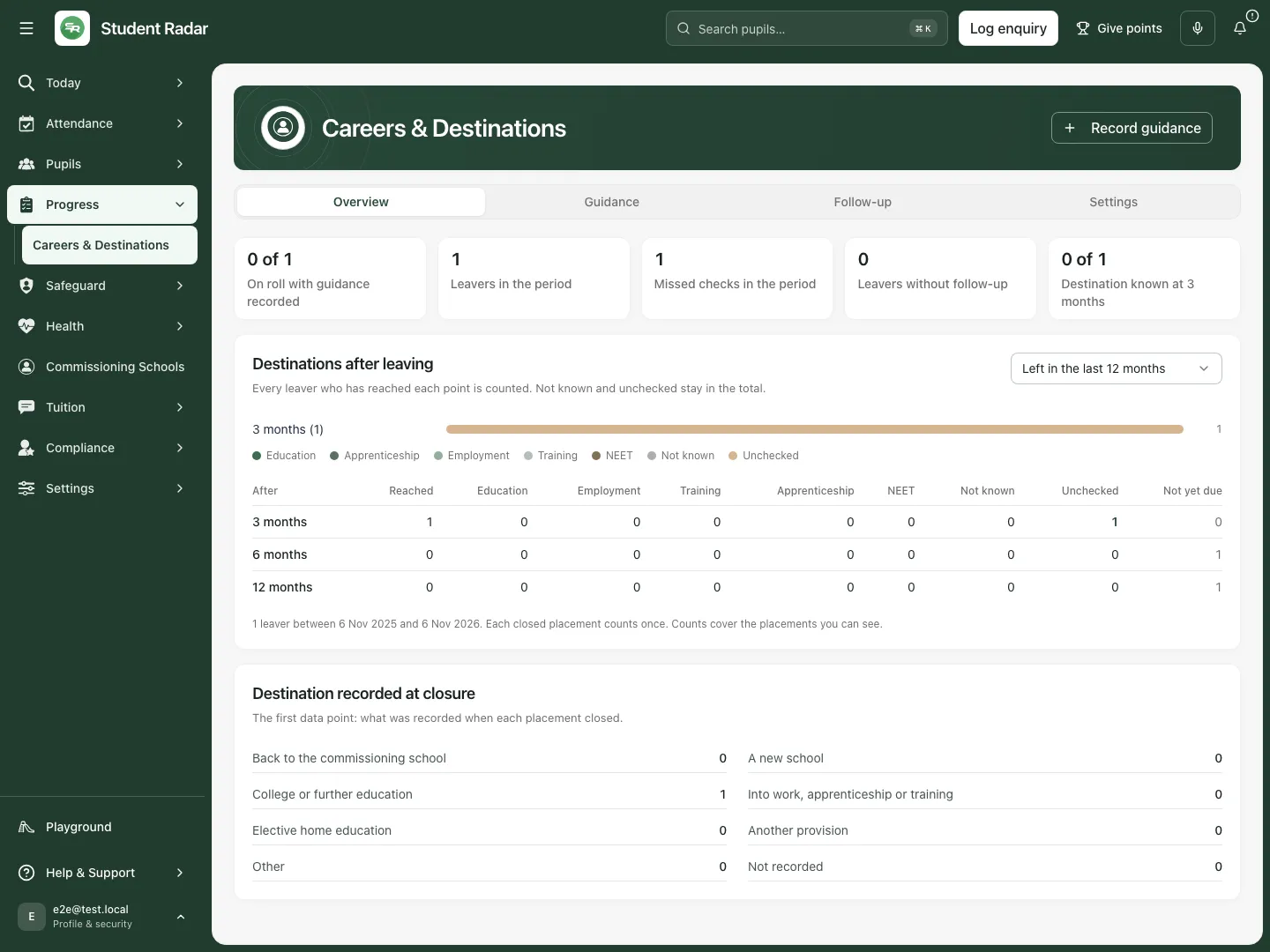 The fictional overview separates current guidance coverage from a leaver’s recorded closure destination and unchecked later follow-up.
Record a guidance interview
Section titled “Record a guidance interview”- Choose Record guidance.
- In Young person, select the intended placement/pupil. Check any “left” date in the option: current and historical placements have different context.
- Set What was it? to Guidance interview.
- Enter the actual Date, Led by, optional Organisation, and Outcome. Record what was discussed/agreed, not a prediction of a guaranteed destination.
- Choose Save. Reopen Guidance, select that Young person, and inspect the saved entry, actual date and recorder.
- Cancel leaves an unsaved form unrecorded. If a save fails or its result is uncertain, inspect the refreshed placement entries before recording another copy. The same unchanged attempt can be retried without deliberately creating a new entry.
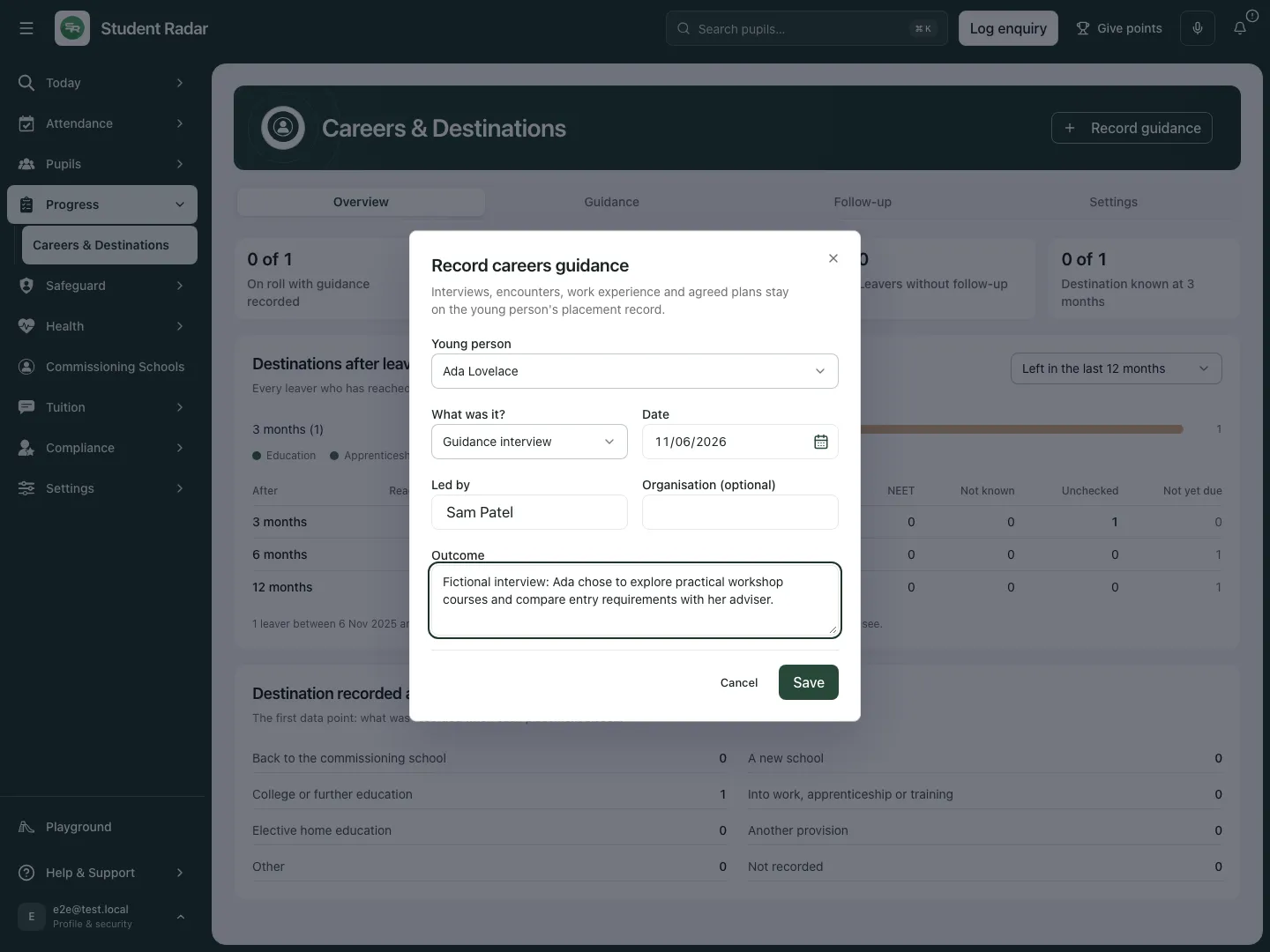 The fictional interview records Ada’s decision to explore practical courses and compare entry requirements with her adviser. It does not claim an enrolment or placement outcome.
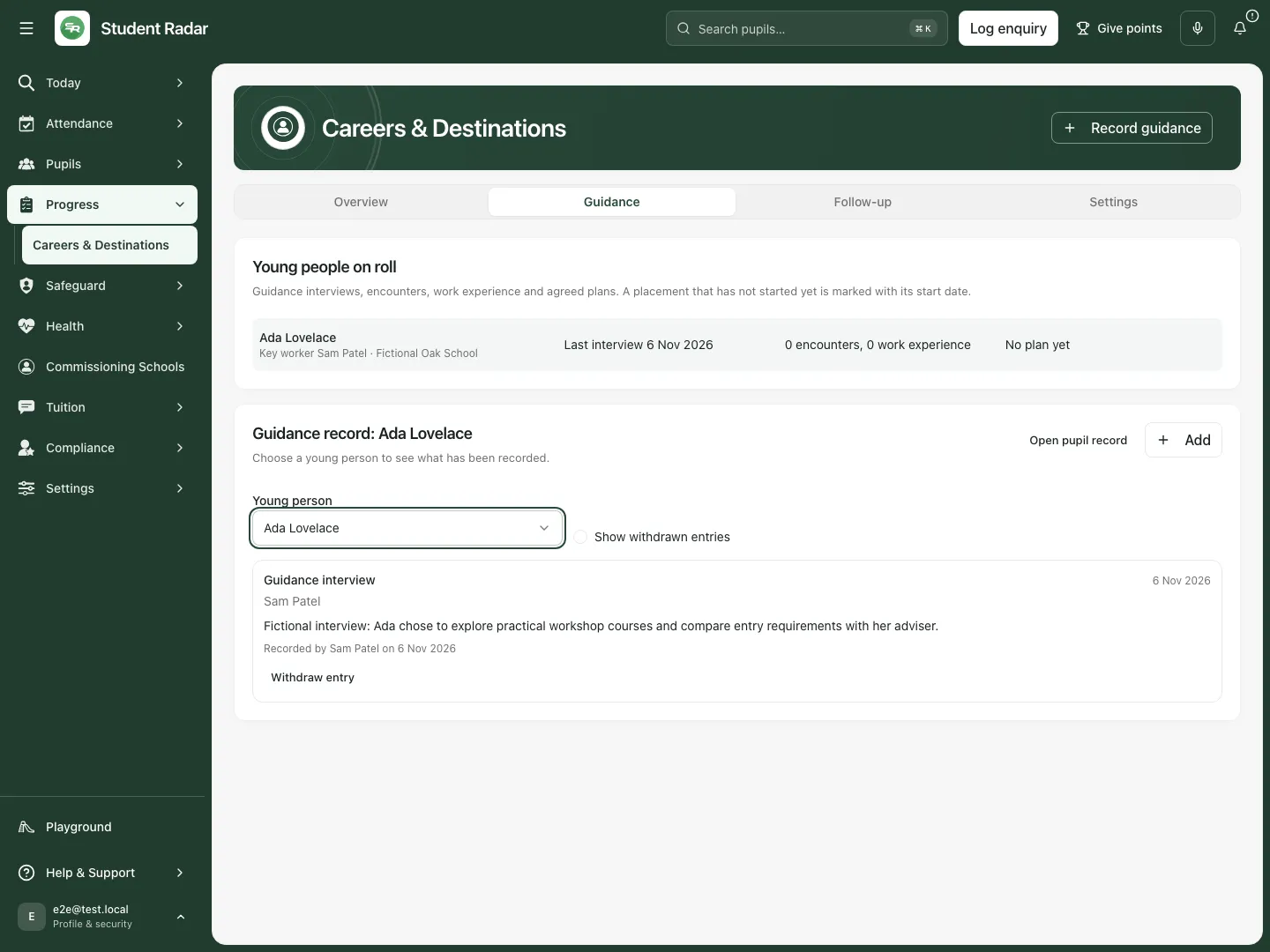 The reopened fictional placement retains the interview outcome and recorder. No message, referral or course application was sent by that save.
Record encounters, work experience or an action plan
Section titled “Record encounters, work experience or an action plan”- Choose Record guidance, select the intended Young person and change What was it? to the actual kind: Employer encounter, Provider encounter, Work experience or Action plan.
- For an encounter, record Date, the organisation/provider field and What happened. The type retains whether the encounter was with an employer or a provider.
- For Work experience, record First day, optional Last day, the organisation/placement field and How it went. An actual record can include planned dates within the form’s limits; do not imply the experience occurred merely because future dates are saved.
- For Action plan, record Date, Actions agreed, optional Review by and Summary. This is a careers action-plan record; it does not automatically create or complete every operational task described in the text.
- Check date validation. Interviews, encounters and action plans cannot be dated in the future. Work-experience date limits differ; last day cannot precede first day, and the span is bounded. An action-plan review date cannot precede the plan and is limited to a year after it.
- Choose Save, then inspect the placement’s Guidance entries. Records retain their type-specific fields; a narrative note must not stand in for an external attendance, course or employment confirmation.
Read or withdraw a guidance entry
Section titled “Read or withdraw a guidance entry”- Open Guidance, select Young person and inspect the entries. Open pupil record opens the permitted pupil context; it grants no additional access.
- Use Show withdrawn entries when reviewing retained withdrawn history.
- For an incorrect current entry choose Withdraw entry.
- Enter Why withdraw it? (at least 3 characters) and choose Withdraw, or Cancel to leave it active.
- Inspect the withdrawn reason/date. Withdrawal preserves the record’s history; it does not retract an actual conversation, encounter or external application.
- Record a corrected factual entry through Record guidance if appropriate. Do not assume there is an inline editor that silently rewrites the original entry.
Review scheduled follow-up and missing intervals
Section titled “Review scheduled follow-up and missing intervals”- Open Follow-up and choose the relevant leaver period.
- Find the intended young person and check Left …, the destination At closure, commissioning school and current follow-up states.
- A scheduled check displays its interval and due date. After its grace period, a still-open check is marked missed and can appear as owned work in My Actions; this is a recording/work state, not proof that no contact attempt occurred.
- If no follow-up was started for an ended placement, Start follow-up creates the checks for the current configured intervals.
- If later settings introduce intervals missing from this leaver, Add these checks adds the missing ones. Existing scheduled dates are retained rather than recalculated by a settings change.
- Inspect the resulting checks and dates. “Follow-up was already running” is different from a new set of checks. A retry must not be treated as a reason to create duplicates.
- A pupil/placement outside the current period can require a wider period; use the offered wider-period action. A linked missed check you own may still be recordable through My Actions, subject to its own checks.
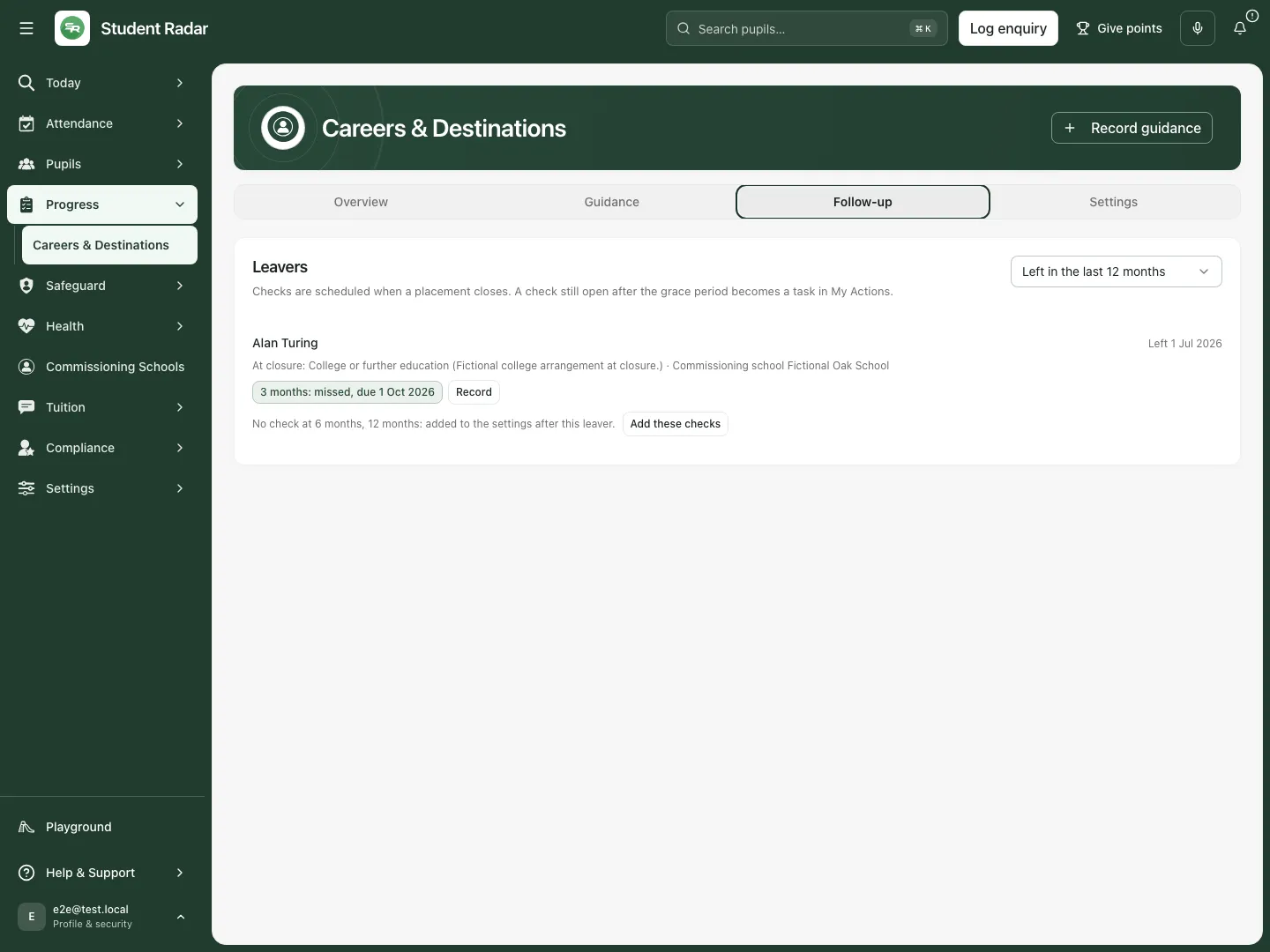 The fictional leaver has a missed three-month check and later intervals not yet scheduled. The college destination at closure is not presented as a checked current destination.
Record what the later check actually established
Section titled “Record what the later check actually established”- On the intended scheduled check choose Record.
- In Record the …-month destination check, confirm the pupil, leaving date and due date.
- Set Where are they now? to Education, Employment, Training, Apprenticeship, NEET or Not known according to the information actually obtained. Do not use Not known to hide a check that has not happened.
- Set How do you know? to the actual source: young person, parent/carer, commissioning school, local authority, destination provider or other.
- Enter Date checked, within the valid range shown by the form, and Note (optional) for proportionate factual context. It cannot be in the future or before the relevant leaving context.
- Choose Record check, then inspect the recorded destination, source, checked date and recorder. Cancel leaves the check unrecorded.
- A save checks the current revision. If someone changed it first, refresh and reconcile; do not assume the result was overwritten. An uncertain save calls for inspecting the current result before retrying.
- This action records information already checked. It does not contact a parent, school, local authority or destination provider, and it does not guarantee the destination remains sustained.
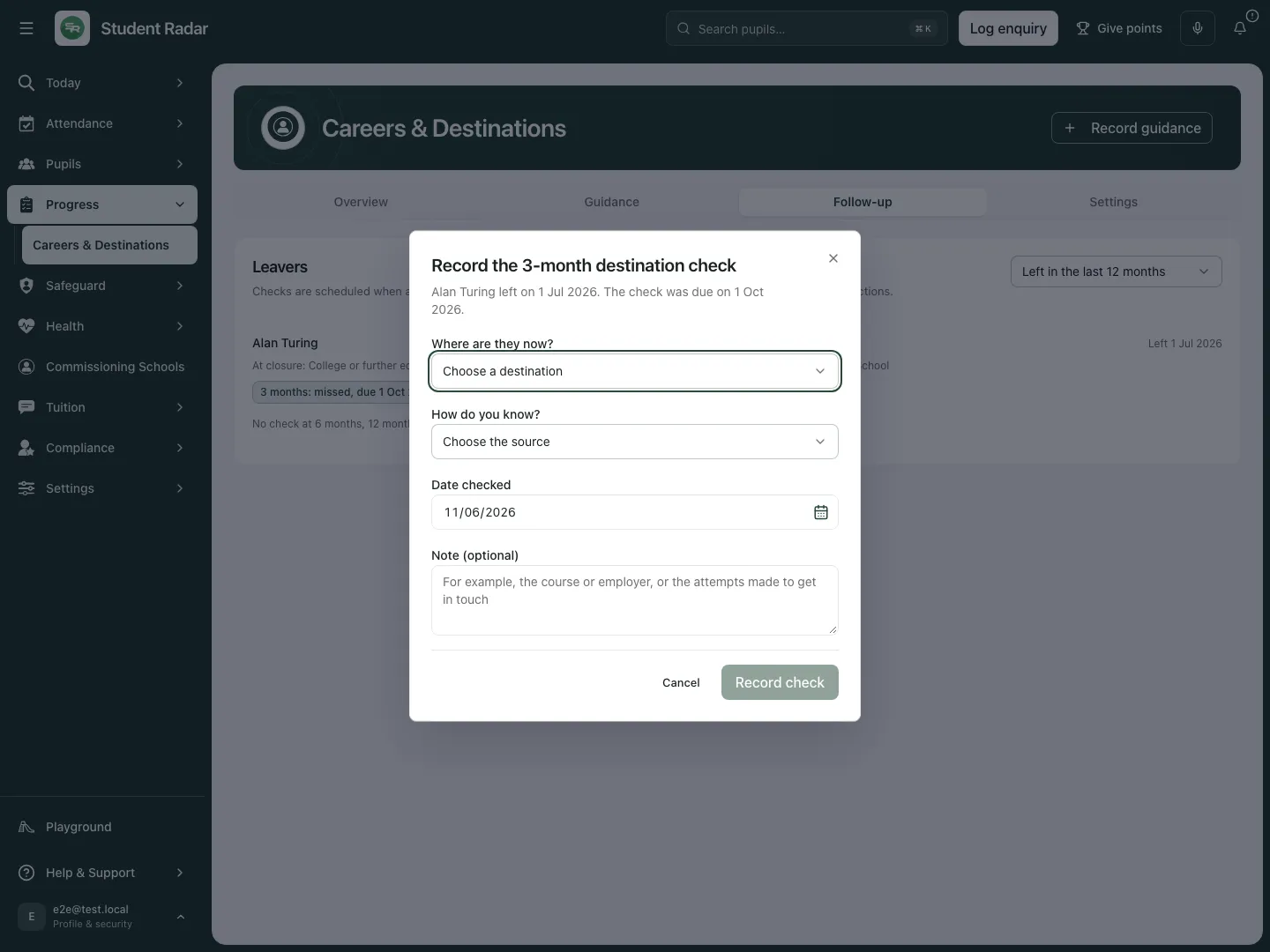 The fictional form asks where the leaver is now, how that is known and when it was checked. It has not recorded a result or contacted anyone in this example.
Configure future destination follow-up
Section titled “Configure future destination follow-up”- Authorised configuration staff open Settings.
- Under Check after leaving (up to six) choose the intended intervals from the displayed month options. At least one and no more than six are allowed; supported intervals are between 1 and 24 months.
- Set Days of grace before a check counts as missed, a whole number from 0 to 60.
- Select Follow-up lead, or keep No lead: the key worker owns missed checks when that is the intended arrangement.
- Read the ownership notice. A task reaches its named owner only when they can read careers records; an otherwise ineligible assignment can be surfaced to leaders in My Actions. Selecting a colleague does not itself grant careers access.
- Choose Save settings and inspect the saved configuration. A stale-settings response means someone changed the current revision; refresh/reconcile instead of overwriting it blindly.
- Changes apply to placements closing from now on. Checks already scheduled retain their dates. For an existing leaver’s missing new interval, use Add these checks explicitly rather than assuming the settings save scheduled it retrospectively.
- Setting a lead or interval does not send a message or perform the future destination check.
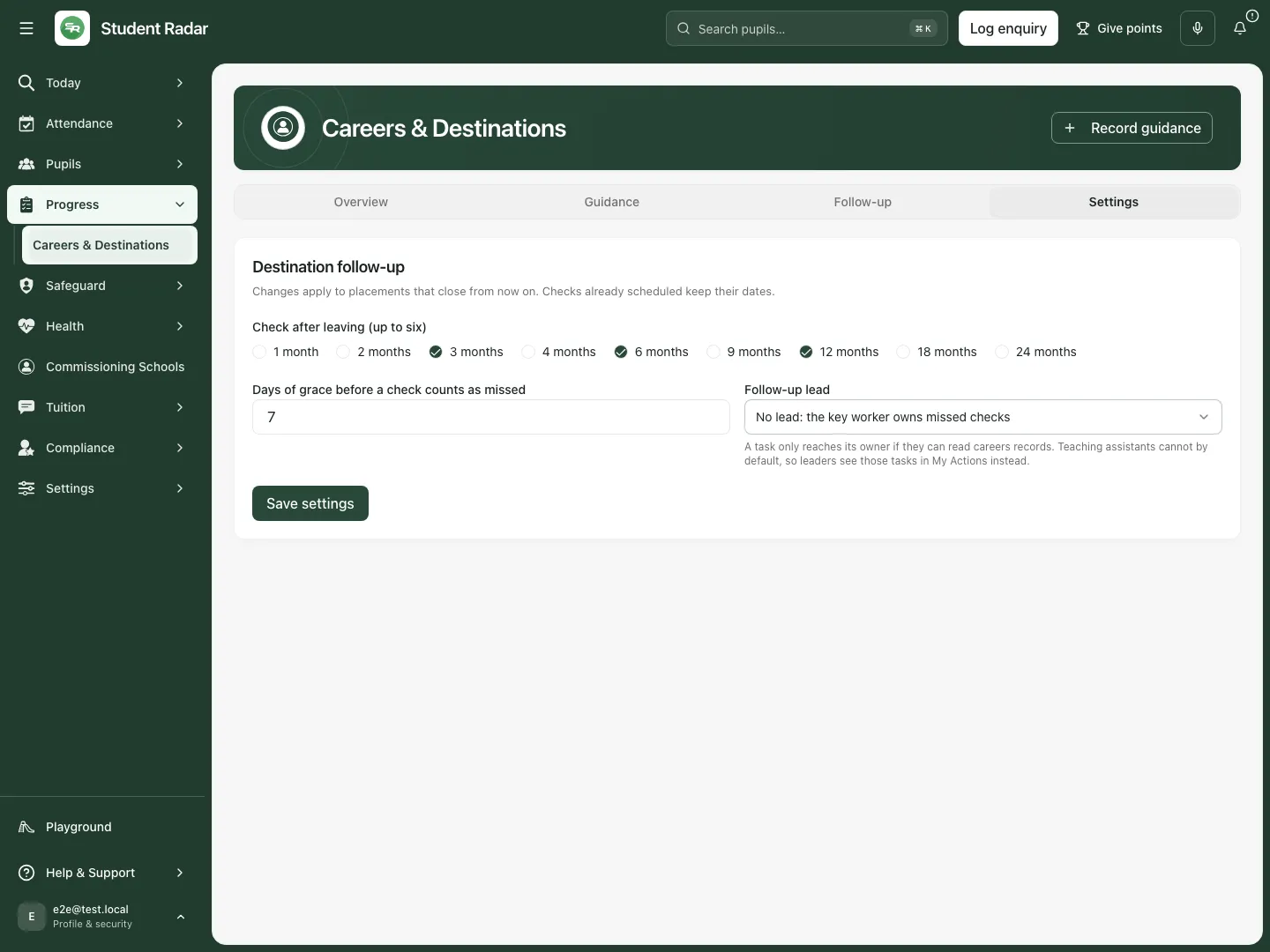 The fictional settings retain intervals, grace and the default key-worker ownership. No settings change was saved in this example.
Use My Actions and phone views
Section titled “Use My Actions and phone views”- Open the missed destination-check task in My Actions when it is assigned to you and permitted.
- Check the placement/interval/source before recording. The task’s completion follows the actual destination-check outcome; it does not establish a sustained destination independently.
- If the task cannot open the leaver in the current period or access was withdrawn, resolve the specific source/access state rather than copying restricted pupil information elsewhere.
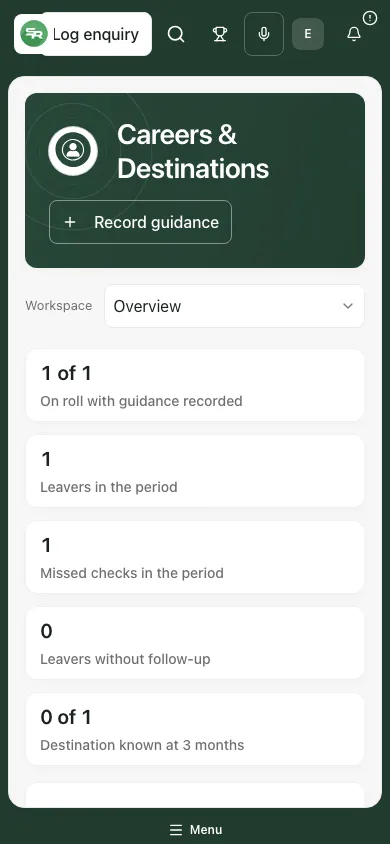 The fictional phone view preserves the period and count distinctions for guidance and destinations.
Problems and questions
Section titled “Problems and questions”Unchecked or Not known? Unchecked means a required point has no recorded result. Not known is the recorded outcome of an actual check. Neither should automatically be treated as NEET.
Why does the closure destination differ from a later result? They describe different dates and evidence. Keep both rather than rewriting closure history to match the latest check.
Why does a guidance count differ from the destination count? Guidance coverage counts current young people; destination reporting counts closed placements in the chosen period and your access scope.
A save failed after I clicked it. Refresh/read the placement or check before creating another record. The app retains/reuses the attempt where possible, but an error is not a successful result.
Can I send a follow-up email from Record check? No. It records actual information and its source. Use the school’s authorised communication process separately.
Related: AP Progress Drivers, My Actions.