Assess EAL evidence and review classroom support
Written for: Staff recording EAL language evidence, classroom support and review decisions.
Capture observed language and support context, make strand judgements and review a focused classroom support plan.
Before you start
Section titled “Before you start”Open Inclusion → EAL in the intended school. The school workspace has Learners and Resources. Opening a learner gives Assessment & language profile and Support & reviews. Use ← Back to learners to return to the register.
Your account needs permitted EAL and Heat Map access. Reading the learner list does not automatically permit every pupil record, edit, AI draft or linked source. If the workspace reports that you do not have access, ask the school’s responsible administrator; a contextual link does not grant it.
The examples show fictional pupils. EAL status and language background are not a diagnosis, a low-attainment judgement or a reason to lower curriculum ambition. Record language evidence and support conditions, including what remains unknown.
Find a learner and understand the denominator
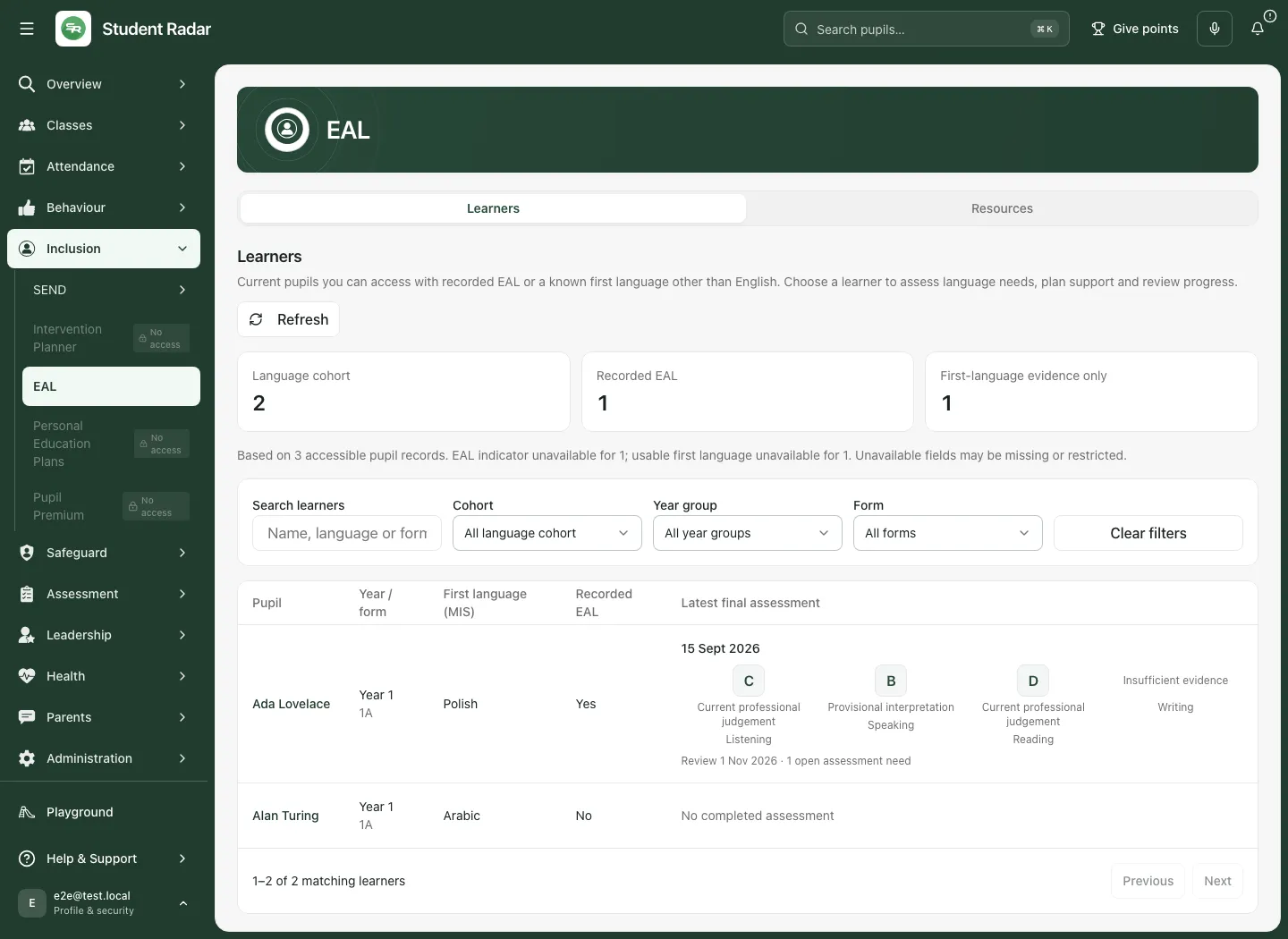
Section titled “Find a learner and understand the denominator”- Open Learners. Read the statement identifying the accessible pupil records on which the register is based.
- Use Search learners and the cohort/year/form filters to find the pupil. Clear filters restores the wider list. Refresh updates the permitted records; a background refresh need not remove the existing rows.
- Check the pupil’s first language and assessment summary before opening the named learner. A language code can be displayed as its language name; unknown or classification-pending values are not evidence of a non-English language.
- In jurisdictions using first-language evidence, distinguish Recorded EAL from First-language evidence only. The latter is inclusion in this view, not a write-back changing the recorded EAL flag. Other jurisdictions may use recorded EAL only and omit that extra filter/tile.
- Missing EAL indicators and missing first-language information are coverage gaps across the accessible source records. They are not automatically additional assessed learners. Not assessed is different from Band A.
A search with no matches is different from an incomplete or failed source read. If the accessible list cannot be loaded completely, the page should not present its partial result as the full register.
Read the language profile
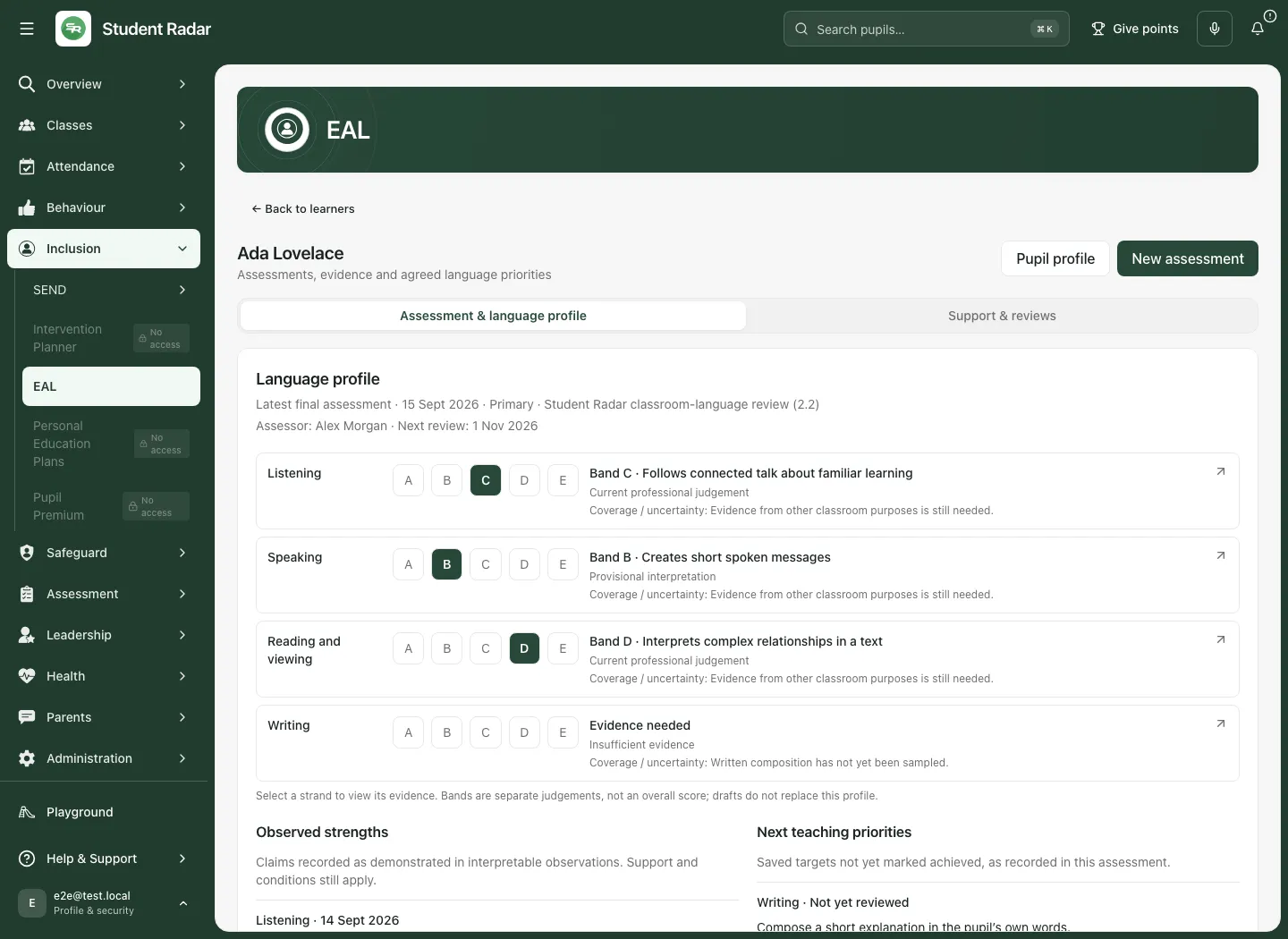
Section titled “Read the language profile”Open Assessment & language profile for the pupil. The profile uses the latest final assessment, not an unfinished draft. It shows Listening, Speaking, Reading and viewing and Writing, with the recorded human judgement and any band. It also brings together demonstrated strengths, priorities and unresolved assessment needs. Select an item to inspect the relevant part of its source assessment.
Read Insufficient evidence, Provisional and Current carefully. Missing or insufficient evidence does not indicate low proficiency. A provisional judgement retains uncertainty; a current judgement still has an evidenced scope and review point. A language profile is not a claim that the pupil performs identically in every subject or setting.
Bands run from A New to English through B Early acquisition, C Developing competence, D Competent and E Fluent. No band is calculated automatically from observation counts. The current observation-and-review design identifies its framework/version and provisional band boundaries; use professional judgement grounded in actual evidence.
Start and save an assessment draft
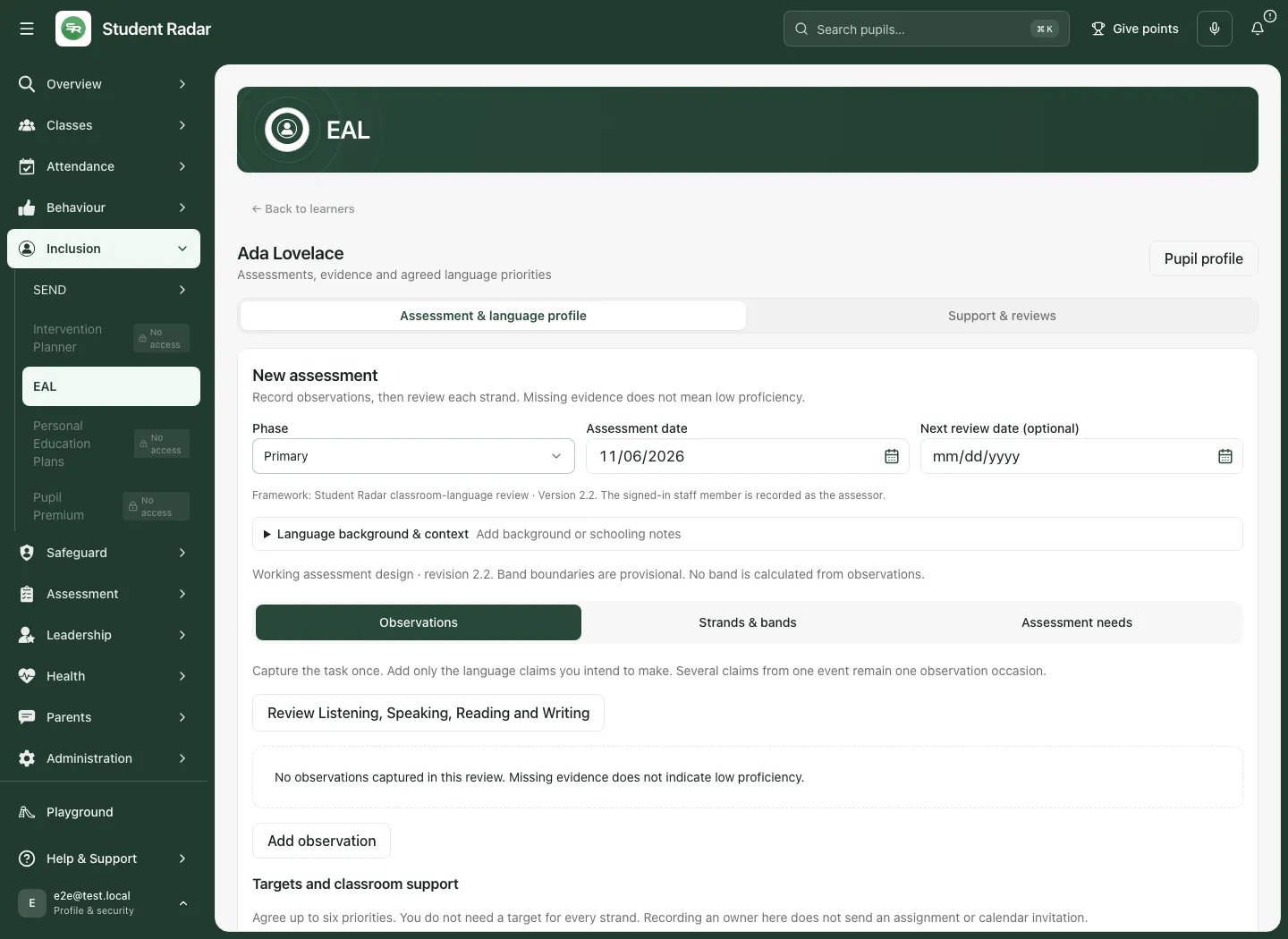
Section titled “Start and save an assessment draft”- In the pupil’s assessment history, select New assessment. If a saved draft is already open, use Edit draft and finish or cancel it before starting another. This one-draft rule applies across history pages.
- Check Phase, Assessment date and optional Next review date. Dates follow the school’s day. Do not future-date an assessment as though it had already happened.
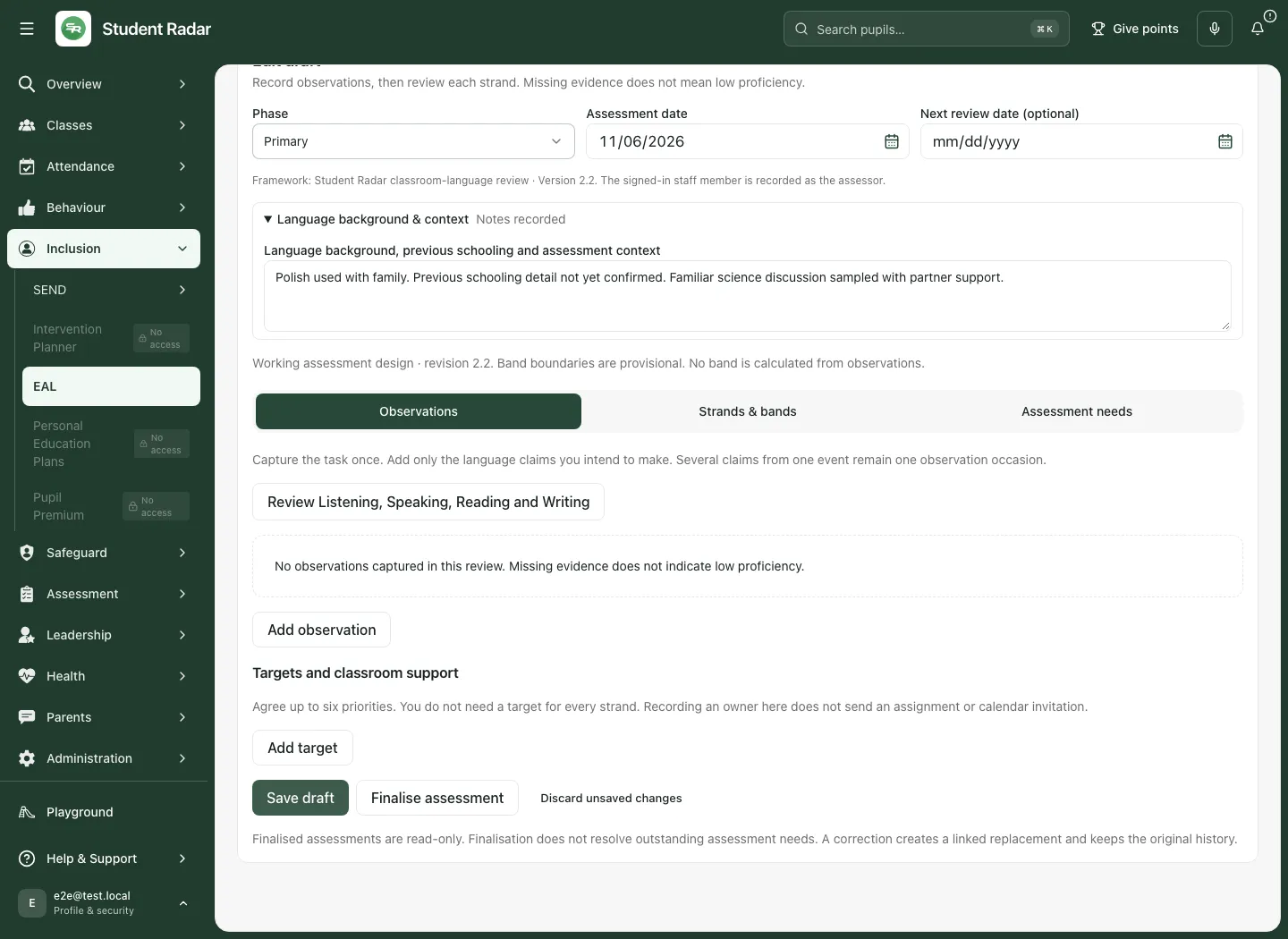
- Expand Language background & context. Record languages and their contexts of use, prior schooling and English exposure, literacy in other languages and pupil/family perspectives with their sources. Leave unknowns explicit.
- Use the three review sections, Observations, Strands & bands and Assessment needs, as described below.
- Select Save draft. A saved draft remains open as Edit draft, so you can keep working. Check the saved version before leaving. Saving a draft does not finalise it or replace the latest final language profile.
- Discard unsaved changes leaves the editor; it does not mean cancel the saved draft. A saved draft remains available after returning/reloading. Use Cancel draft from history only if you intend to abandon that saved draft, and read its confirmation; cancelled drafts cannot be reopened.
Changing phase keeps observations but clears strand judgements for review in the new task context. Read Confirm phase change before proceeding, or choose Keep current phase. Earlier saved assessments retain their original phase.
Capture an observation without turning support into independent evidence
Section titled “Capture an observation without turning support into independent evidence”- In Observations, choose Add observation. Record Observation date, Observed by or the source details when unknown/reported.
- Describe Actual task and purpose, Actual English input or prompt sequence and What the pupil did or said. Preserve the pupil’s actual response and any first/supported attempts, rather than substituting the expected answer.
- Expand Input, response route and conditions to record the input route, response purpose and conditions. Distinguish spoken input from print, mixed input and uncertain attribution.
- Record the help supplied: English, home-language or other support as applicable, with detail. If language was supplied or rehearsed, preserve that fact rather than treating the response as independent composition.
- Add only the language claims the event supports. Record the strand, claim, whether the evidence is interpretable, what performance it demonstrates, the attributable source and interpretation. Several claims from one event remain one observation occasion.
A print-meaning claim needs a separately attributable contribution from print. A spoken-meaning claim needs a spoken contribution. Where spoken and visible text cannot be separated, retain combined input/uncertainty. Writing composition needs a written-message purpose and wording attributable to the pupil; copying or supplied wording is not automatically composition.
Make strand judgements and record assessment needs
Section titled “Make strand judgements and record assessment needs”In Strands & bands, select each strand. Record its judgement state, rationale or evidence gap, evidenced scope, uncertainty/missing coverage and review point. An insufficient-evidence strand cannot have a band. A non-insufficient judgement needs a human-selected band and scope. A provisional judgement needs its uncertainty explained. Before finalising, every strand needs a rationale or explicit evidence gap, including strands not observed.
In Assessment needs, record the unanswered question, whether it is unresolved/resolved, the resolution and intended follow-up, owner/date where appropriate. Missingness should lead to a proportionate next observation or an explicit reason it cannot yet be obtained. Finalising an assessment does not resolve those questions automatically.
Use Targets and classroom support → Add target for up to six priorities; a target is not required for every strand. Record the target, support, owner, review date and later outcome/evidence. An owner entered here does not send an assignment or calendar invitation.
Finalise, review again or correct
Section titled “Finalise, review again or correct”- Check the whole assessment, including support conditions, evidence gaps and pupil identity. Save the draft first.
- Select Finalise assessment when the record is ready. Resolve the validation message rather than filling unknowns with invented evidence.
- Check the final history entry and refreshed language profile. Finalised assessments are read-only.
- Use Review again for a later assessment: it carries useful context/priorities forward while resetting the review judgement work. It is not a silent edit to the previous final assessment.
- Use Correct for an error in a final record. Give a correction reason and review the replacement fully. The correction creates a linked replacement and retains the original history.
If another draft is in progress, New assessment, Review again and Correct are withheld until that draft is finalised or cancelled. If the workspace cannot check for an open draft, use Check again rather than trying to bypass the check through an older page or link.
Turn evidence into a teaching support plan
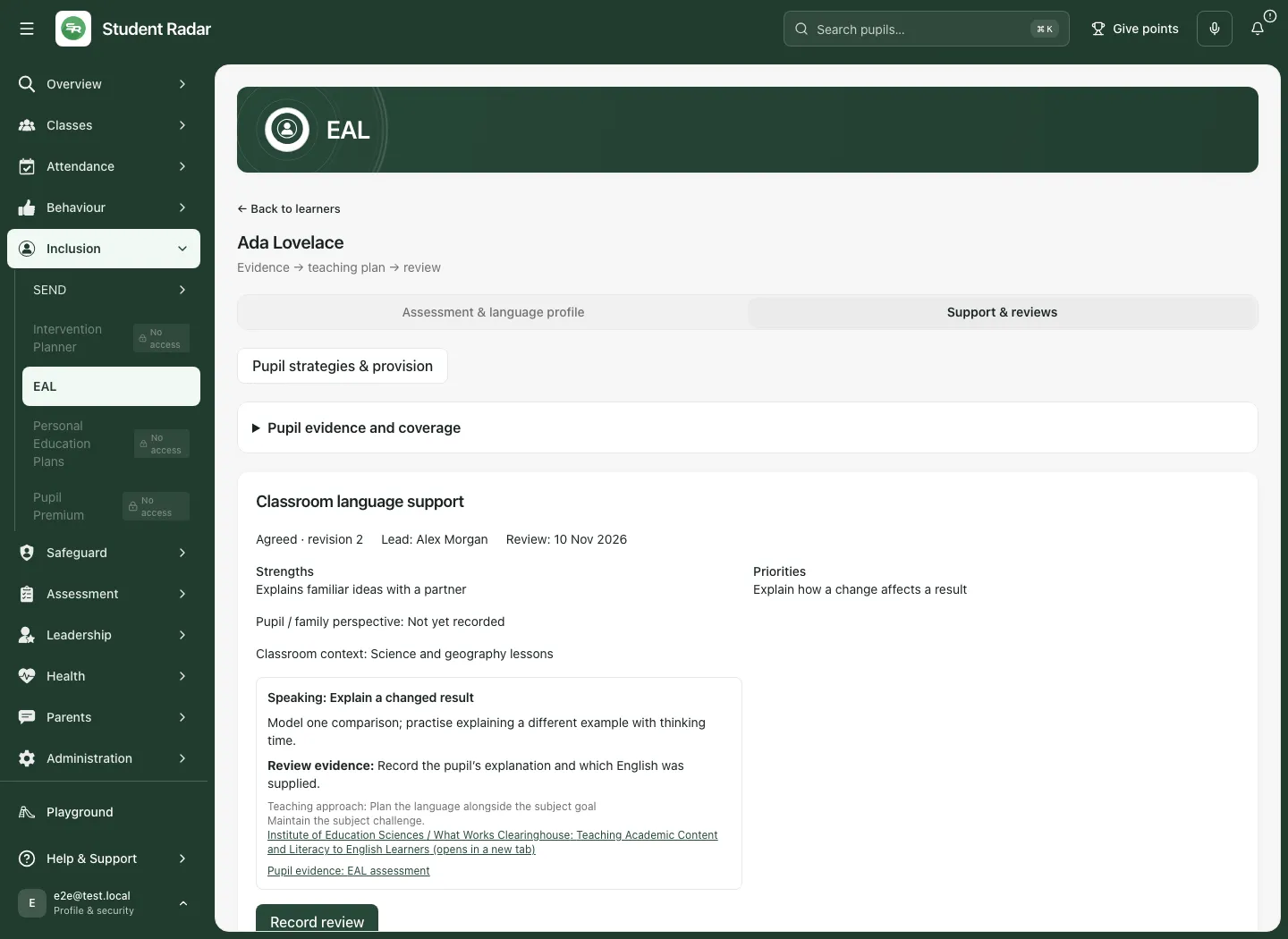
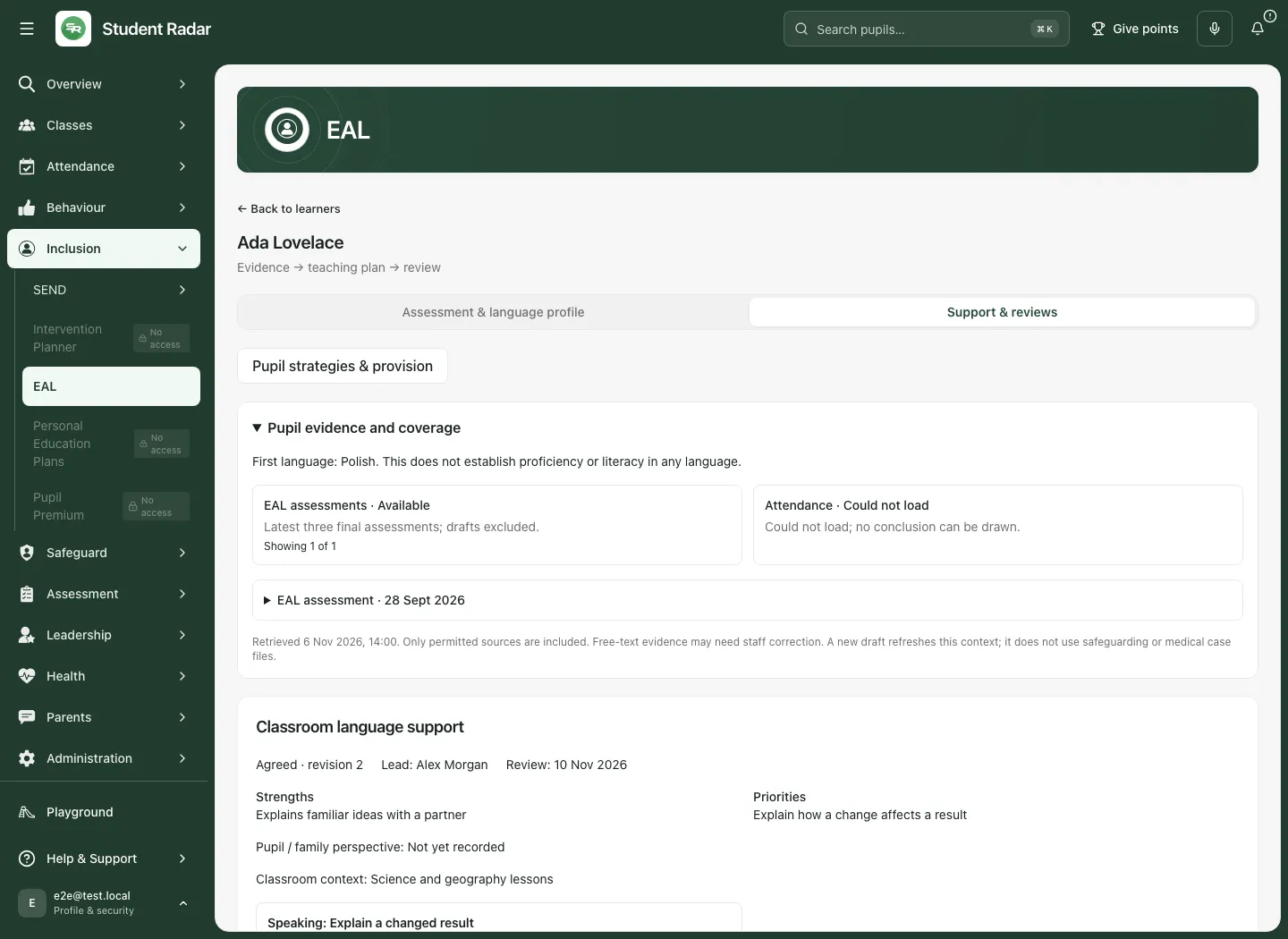
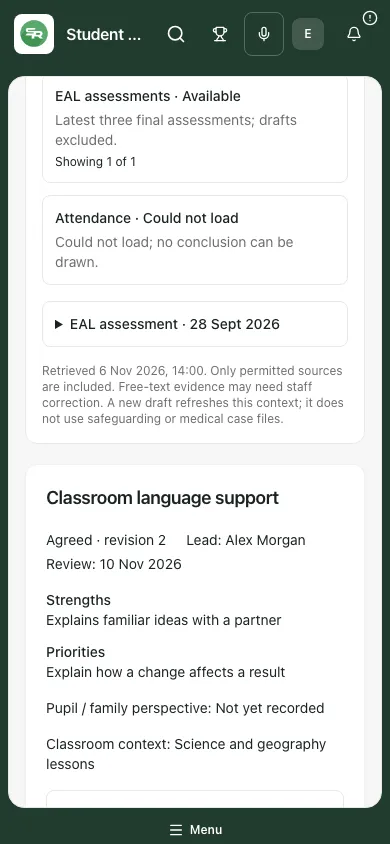
Section titled “Turn evidence into a teaching support plan”Open Support & reviews. Expand Pupil evidence and coverage before making decisions. It identifies retrieved evidence, source links and unavailable/empty sources. Read included/total coverage and any truncation; an unavailable attendance or assessment source does not mean there is no evidence or that the pupil has no needs. Open source/pupil evidence links take you to the permitted assessment, intervention or relevant pupil profile section. Unsaved work can restrict those links until you save or discard it.
To write a plan:
- Where no current plan is open, choose Write a plan. Record a clear title, strengths, priorities, pupil/family perspective and classroom context.
- Add focused targets with a language strand, goal, teaching strategy, success evidence and relevant pupil-evidence/teaching-library references. Usually two or three focused targets are more workable; the maximum is five.
- Use Save draft to preserve the draft. Check the reloaded plan before leaving.
- Where available, AI can suggest a draft from the authorised evidence and cited strategy library. It cannot assess proficiency, decide need or agree a plan automatically. Read every suggestion, source and limitation; no saved/agreed plan should be inferred from generation alone. A source-permission change, expired draft or failed request may require a fresh draft rather than retrying an old result.
- When the plan is ready, set First review date to a future date within the next year and select Agree plan & set review. Agreeing makes the signed-in staff member the review lead and creates the review reminder. Check the agreement and review date; a reminder is not proof that teaching happened or the pupil benefited.
Saved draft cancellation asks for confirmation and differs from discarding an unsaved edit. The current agreed plan is distinct from a new draft; do not treat changing a draft as changing the agreed teaching arrangements until the relevant agreement action succeeds.
Review teaching, evidence and next steps
Section titled “Review teaching, evidence and next steps”- On an agreed plan, select Record review.
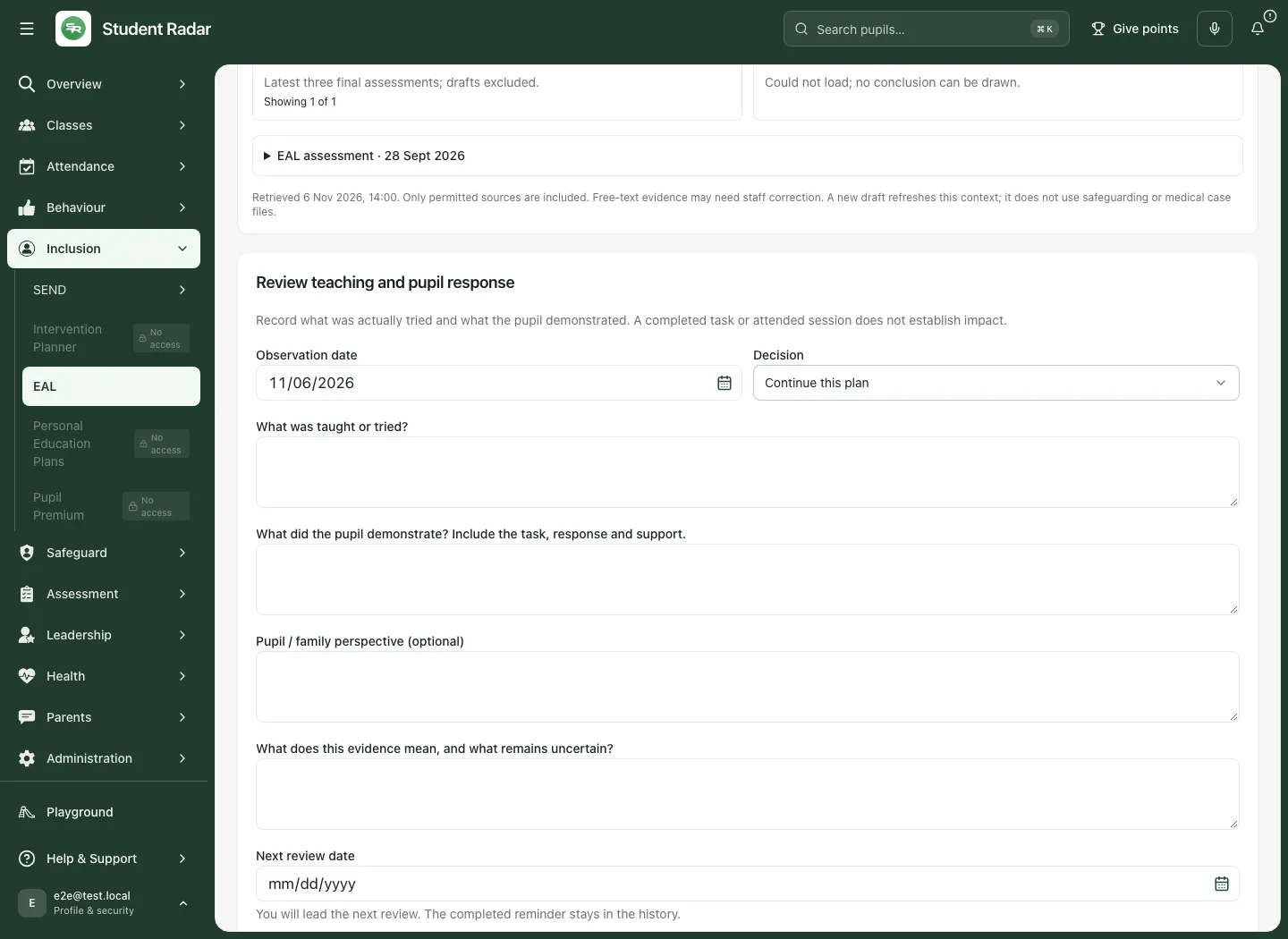
- Set Observation date. It must not be future-dated or before the plan was agreed.
- Choose Continue this plan, Adjust the teaching plan or Close this support cycle in Decision.
- Describe What was taught or tried?, What did the pupil demonstrate? Include the task, response and support., the optional pupil/family perspective, and What does this evidence mean, and what remains uncertain? Delivery and demonstrated learning belong in separate answers.
- For an adjustment, edit the actual target/strategy content. For continue/adjust, set the Next review date, in the future and within the next year. The saving reviewer will lead the next review; the completed reminder remains in history. Closing has no new review date.
- Select Save review & decision. Check the refreshed state and Plan and review history. Closing a plan is a decision about that cycle; it does not confirm every target achieved or close unrelated SEND/intervention work.
The history presents the latest 20 accessible cycles, with up to 30 snapshots per cycle. It is a bounded view, not a claim that no older record exists.
Find and evaluate a teaching strategy
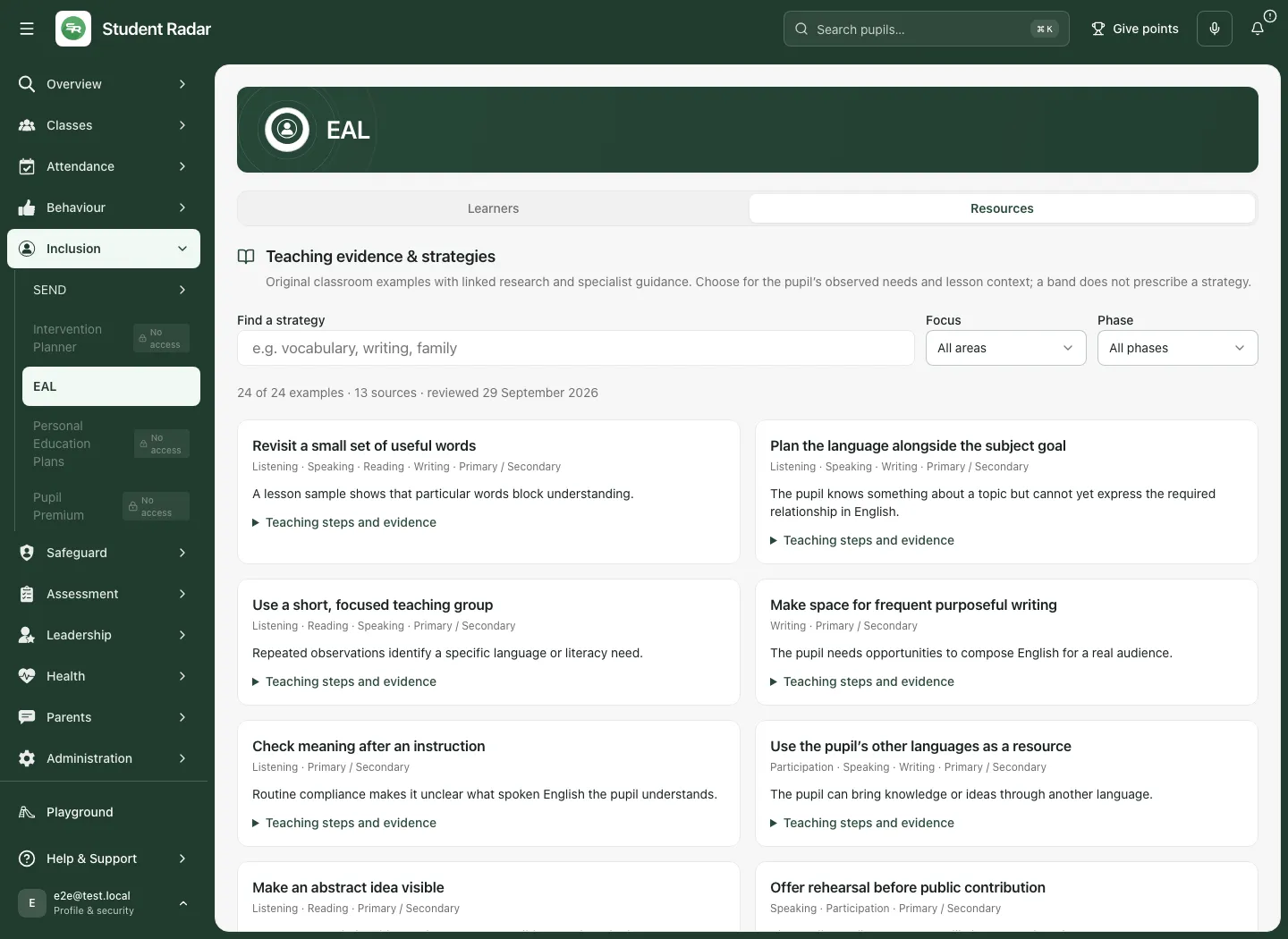
Section titled “Find and evaluate a teaching strategy”Return to the school workspace and select Resources. Use Find a strategy, Focus and Phase. Read the activity/teaching approach, evidence sources, scope and limitations. Publishers’ links open separately.
Research involving English learners, broader literacy research and professional guidance are labelled separately. A cited source supports an approach; it has not tested this exact app example or guaranteed an outcome for the pupil. Maintain subject challenge and review the actual response with the recorded support conditions. The library is not an endorsement by its source publishers.
On a phone or when something fails
Section titled “On a phone or when something fails”Use the workspace selector to move between the pupil sections and scroll to the relevant record. Save or deliberately discard work before navigating. A failed source read, unavailable backend update or refused save is not a saved assessment/plan. Keep your text, read the reason and use the offered retry/reload. If another person changed the record, inspect the latest revision before intentionally applying your changes; do not create a second draft to bypass a conflict.
Related: Use Intervention Planner · Find a pupil and read their profile · Review SEND targets.
Common questions
Section titled “Common questions”Can I record supported language as independent performance?
Section titled “Can I record supported language as independent performance?”Keep the actual task and support conditions with the observation. Do not turn a supported response into independent evidence.
What should I check before judging progress after support?
Section titled “What should I check before judging progress after support?”Review teaching, new language evidence and next steps with their conditions and uncertainty. Completed support alone is not proof of learning.