Check how close you are to the registration threshold
Written for: Alternative provision leaders who manage compliance.
If your provision isn’t registered as a school, the Registration section of the Compliance Checklist shows whether your own records suggest you may need to register as an independent school, this week or in the coming term. It counts the pupils of compulsory school age with 18 or more agreed hours a week with you, and how many of them have an EHC plan or are looked after. It also shows which facts are missing.
The indicator is a prompt for your own judgement. It isn’t a legal ruling, and it never changes your registration status. Check what it shows against the DfE guidance, and take advice before you decide anything.
Before you start
Section titled “Before you start”- The section appears while your provision isn’t recorded as a registered school in Provision Settings. Once your Provider registration status is Registered school (PRU, AP academy or independent school), it’s hidden.
- You need permission to manage provision compliance. By default, provision leaders have it. Other staff see a message instead of the figures.
- It only counts the pupils you can open. Whoever reviews registration should be able to open every pupil.
Open the Registration section
Section titled “Open the Registration section”- In the sidebar, open Compliance and choose Compliance Checklist.
- Click Registration.
On the Checklist section, the Registration indicator card shows the same overall signal.
Read the signal
Section titled “Read the signal”The cards at the top count this week: the pupils of compulsory school age at or above 18 agreed hours, how many of those have an EHC plan or are looked after (Of those, EHC plan or looked after), and the most there could be once missing facts are recorded (Could be at or above, with unknowns). The last card gives the strongest signal over the next 13 weeks.
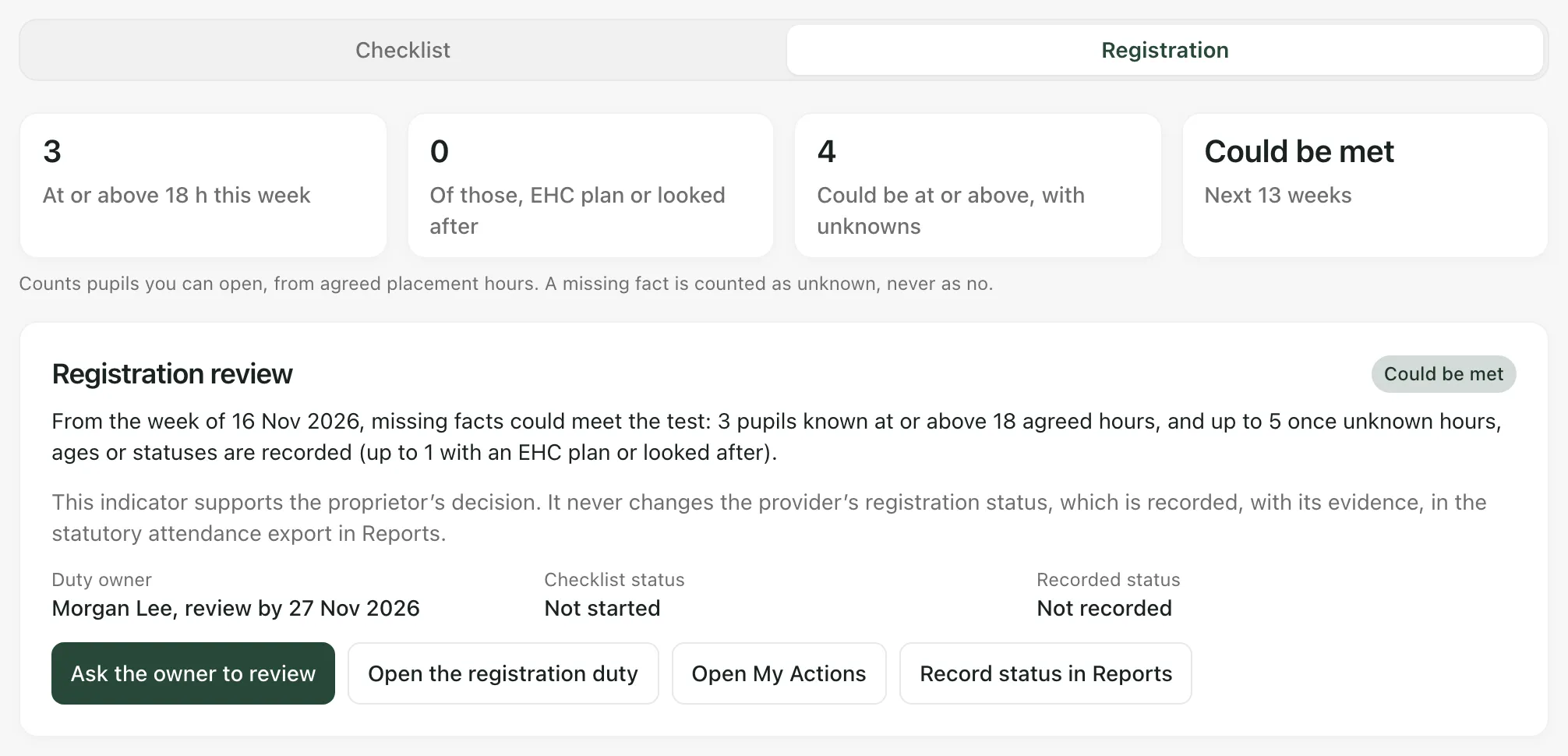
| Signal | What it means |
|---|---|
| Review needed | On the facts you’ve recorded, the test is met in at least one week. |
| Could be met | The recorded facts don’t meet the test, but the missing ones could. |
| One pupil away | One more pupil of compulsory school age at or above 18 agreed hours would meet it. |
| Below indicator | Every week is below the indicator: fewer than five such pupils, and none of them with an EHC plan or looked after. |
A missing fact is counted as unknown, never as no. A pupil without a date of birth, for example, isn’t treated as outside compulsory school age.
What the indicator counts
Section titled “What the indicator counts”A week meets the test when either:
- five or more pupils of compulsory school age have 18 or more agreed hours a week with you, or
- at least one of those pupils has an EHC plan or is looked after.
Keep in mind:
- Agreed hours, not attendance: the hours come from each placement’s agreed hours per week, not from your registers.
- Older placements: a placement whose Arrangement (optional) is Full time (legacy) counts as full-time whatever its hours. Change it if that isn’t right.
- Age: a pupil counts in a week if they’re of compulsory school age on any weekday of it.
- The window: this week and the 12 weeks after it. Planned placements count from their start date, and placements stop counting after their expected end.
- Not taken into account: daytime hours, education the pupil gets elsewhere, pauses, closures and term dates, and recent changes in the law. The full list is under Method and coverage.
Method and coverage also shows the Observation window, the Test, how many pupils have every fact recorded (Coverage) and the Sources the method is based on. It links to the DfE registration guidance for England.
See when it changes
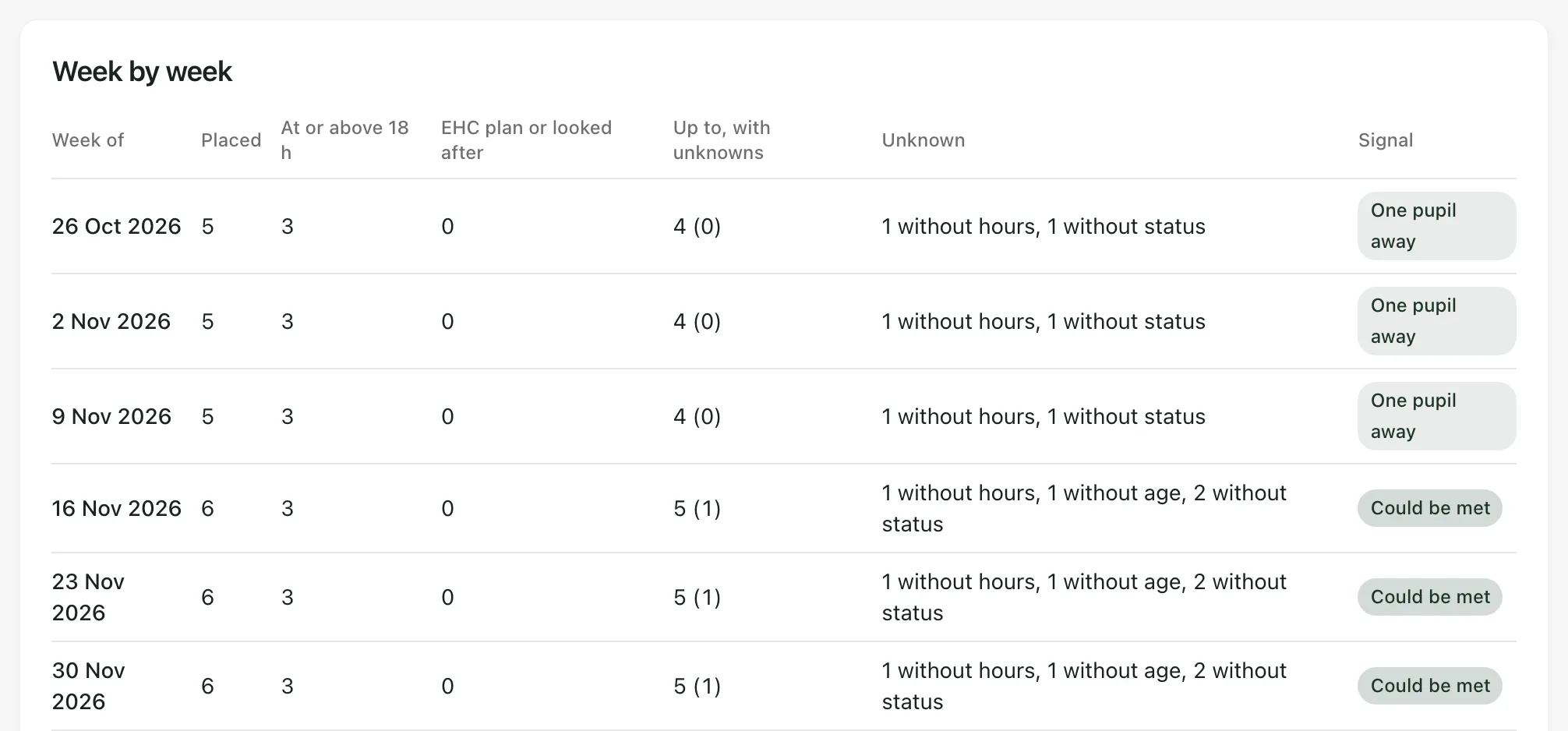
Section titled “See when it changes”Week by week lists each week in the window with how many pupils are Placed, how many are at or above 18 hours, how many of those have an EHC plan or looked after, the Up to, with unknowns figures, what’s Unknown, and the week’s Signal. Use it to see the effect of a placement that’s starting or ending, before you agree a new one or extend someone’s hours.
Fill in missing facts
Section titled “Fill in missing facts”The table of pupils and agreed hours lists each pupil with an agreed placement in the window: their hours This week, Weeks at or above 18 hours, whether they’re of Compulsory school age, whether they have an EHC plan or looked after, and what’s Missing.
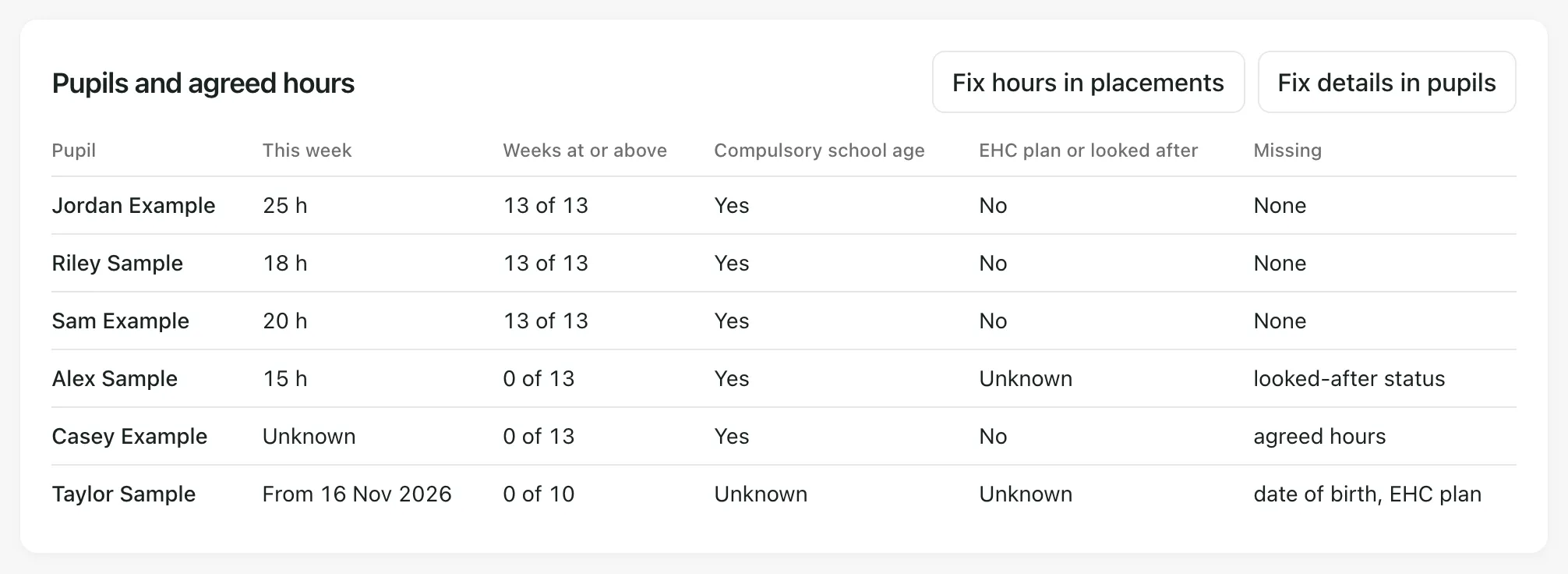
- For missing agreed hours, click Fix hours in placements and edit the placement. See Record a placement and share updates with the commissioning school.
- For a missing date of birth, EHC plan or looked-after status, click the button next to Fix hours in placements to fix details on the Pupils page. See Add or import your pupils.
The figures catch up within a few minutes. To see your changes straight away, reload the page.
When the signal says to review
Section titled “When the signal says to review”When the signal is Review needed or Could be met, ask the person who owns the registration duty to review it.
- Under Registration review, check the Duty owner. If it says No owner assigned, click Open the registration duty and give the Registration requirements reviewed duty an owner and a review date. See Evidence your compliance duties.
- Click Ask the owner to review. You’ll see “Review requested”.
The registration duty is marked Needs attention, with the reason added to its note. Its evidence and last review date are kept. The owner gets the review in My Actions and on the calendar. The button now says Review requested. You can ask again once the recorded facts change.
If the signal is One pupil away, there’s no review button yet. Check the figures before you admit another pupil or increase someone’s agreed hours.
Review and record the decision
Section titled “Review and record the decision”If you own the duty:
- Read the figures, the missing facts and Method and coverage.
- Check them against the DfE registration guidance for England, with your proprietor. Take advice where you need it.
- Record what you reviewed and decided on the Registration requirements reviewed duty, with any evidence.
- If your provision’s registration status changes, record the reviewed status with its evidence. Click Record status in Reports, then Attendance exports, and fill in Reviewed regulatory status. See Export statutory attendance evidence. Then update Provider registration status in Provision Settings. See Set up your provision profile and activate AP operations.
Recorded status under Registration review shows the reviewed status, and Checklist status shows where the registration duty stands.
- England only: the indicator follows the rules for England.
- Today: Today may show Review independent-school registration. That’s a simpler check of today’s placements. Click Open compliance checklist, then Registration, for the full picture.
- Your provision’s words: labels use your provision’s Setting profile, so the word for pupil may differ.
If something doesn’t work
Section titled “If something doesn’t work”| What you see | What to do |
|---|---|
| “You need permission to manage provision compliance to see the registration indicator.” | Ask a provision leader to check the figures, or to give you access. |
| “The registration indicator is unavailable. Nothing has been assumed about registration; check placements and the DfE guidance directly.” | Click Try again. If it keeps happening, check your placements and the guidance yourself until it’s back. |
| “Assign an owner on the registration duty in the checklist so the review reaches them.” | Click Open the registration duty and give it a Duty owner. |
| “The recorded facts changed. The indicator has been refreshed; check it and try again.” | Someone changed a placement or pupil while you had the page open. Check the new figures, then ask again if you still need to. |
| “The indicator no longer suggests a review.” | The facts changed and no review is suggested now. Check Week by week before you decide anything. |
| “This provision is recorded as registered, so the registration duty does not apply.” | Your reviewed status says you’re registered. If that’s wrong, correct it under Reviewed regulatory status. |
| “Too many requests. Try again in a few minutes.” | Wait a few minutes, then click Ask the owner to review again. |
| “You do not have permission to manage provision compliance.” | Ask a provision leader to request the review. |
| “Something went wrong. Nothing was changed.” | Try again. If it keeps happening, contact Student Radar support. |