Record a dose given
Written for: Staff who give medicines in school.
Each time you give a pupil a medicine held in school, record it on the Medications page straight away. You can also record that a dose was refused, missed or unavailable. The record goes into the administration log with your name and the time, updates Today’s medication round and takes the dose off the medicine’s stock.
Find the medicine
Section titled “Find the medicine”- In the sidebar, open Health, then Medication & Clinical Safety, and choose Medications.
- Find the dose in one of two ways:
- Under Today’s medication round, find the pupil and medicine and click Record administration.
- Or search by pupil or medicine name, then click the medicine in Active medications on site.
The medicine’s window opens, with its instructions, stock, schedule and recent doses.
Record a dose that was given
Section titled “Record a dose that was given”- Scroll to Record administration and click Record administration.
- Check the Time. It’s filled in with the current time at your school. Change it if you gave the dose earlier.
- Leave the Outcome as Given.
- In Stock units used, enter how many units you took from the stock, such as 1 tablet. If the stock hasn’t changed, enter 0 and explain why in Stock adjustment note.
- In Dose, enter the amount you gave.
- In Reason / remarks, add anything others should know. For a PRN (as needed) medicine, record the symptoms or reason for giving it.
- Click Save.
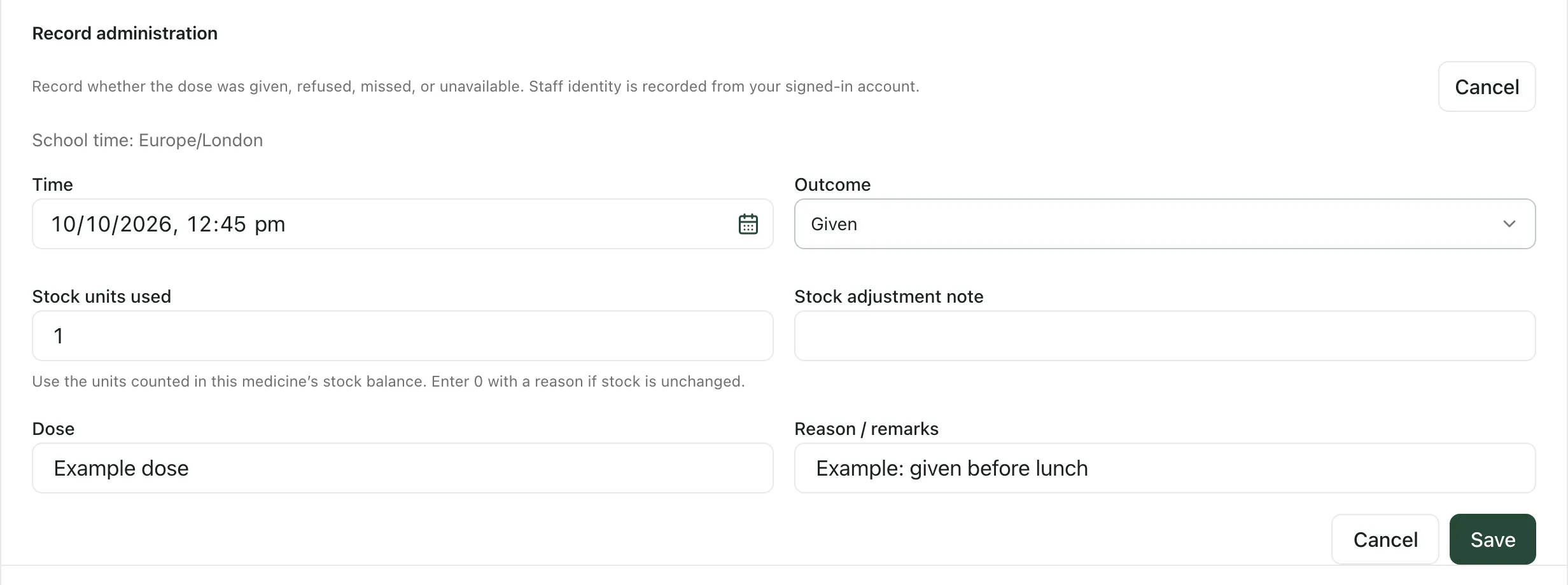
Your name is recorded from your signed-in account. The dose appears in the medicine’s Administration log and in the Administration log on the page, and the round shows it as Given with the time.
Record a dose that wasn’t given
Section titled “Record a dose that wasn’t given”- Click Record administration.
- Check the Time.
- Under Outcome, choose Refused, Missed or Unavailable.
- Choose a Reason, such as Pupil refused, Pupil absent or Parent/carer asked us to hold dose, and add a Reason note if it helps.
- Click Save.
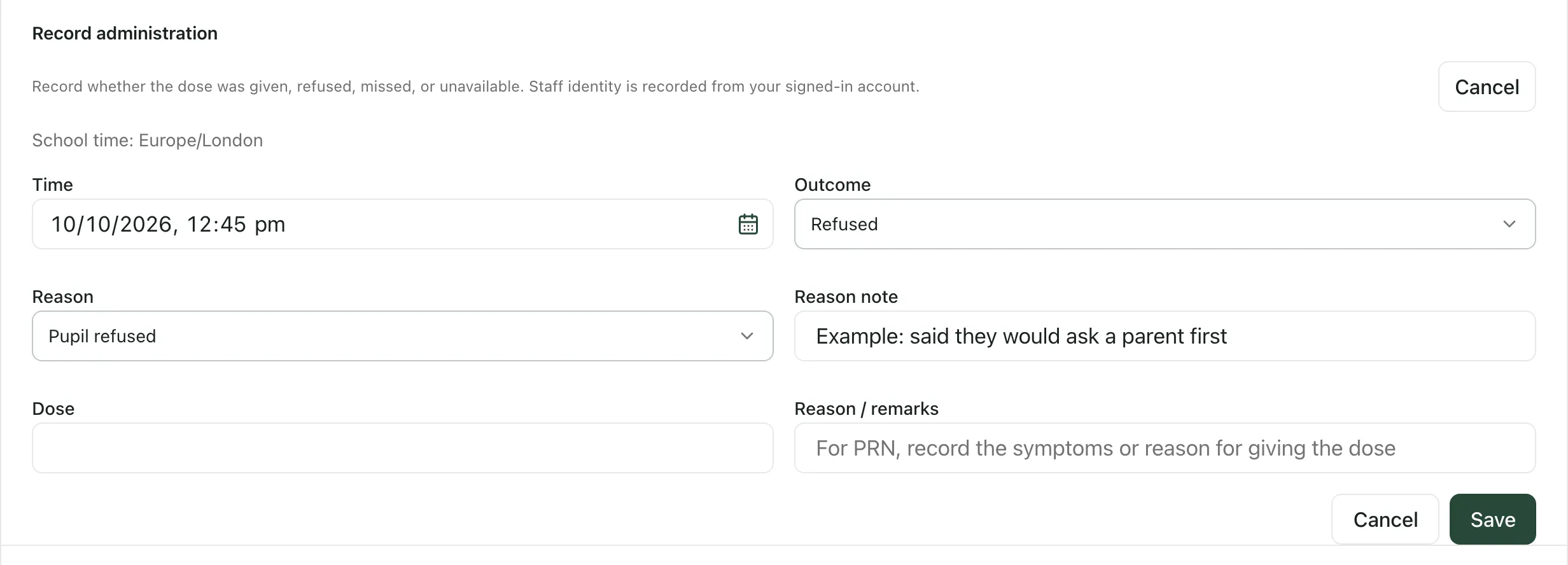
Stock doesn’t change for a dose that wasn’t given. Follow your school’s medicines policy for telling parents and anyone else who needs to know.
What the round shows
Section titled “What the round shows”Today’s medication round lists the doses due today from each medicine’s schedule, matched against the administration log:
- Upcoming: due later today.
- Due now: from 30 minutes before the scheduled time to an hour after it.
- Overdue: one to three hours after the scheduled time, with nothing recorded.
- Missed: more than three hours after the scheduled time, with nothing recorded.
- Given, Refused or Unavailable: a record has been saved for that dose.
- PRN — as needed: an as-needed medicine, with the time it was last given.
A record within two hours of the scheduled time counts for that dose. For a PRN medicine, the round warns you if the minimum interval since the last dose hasn’t passed, or if the daily maximum has been reached, and shows the escalation instructions. These are prompts: check the protocol and follow your school’s medicines policy.
- Controlled drugs: for a controlled drug, a given dose is recorded in the witnessed controlled drugs register with Record in CD register. The Record exception button records only a refused, missed or unavailable dose.
- Telling parents: some roles, such as medical leads and office managers, see Notify parent next to a recorded dose. It emails the parent or carer about that dose, and the dose then shows Parent notified.
- Permissions: recording a dose needs permission to update medicine records. If your record isn’t saved, ask your school’s medical lead or Student Radar administrator.
- Printing a record: under MAR sheet on the page, choose dates and click Print MAR or Export CSV for a medication administration record.
- Adding medicines: see Add a medication and its schedule.
If something doesn’t work
Section titled “If something doesn’t work”| What you see | What to do |
|---|---|
| Record administration is greyed out | Student Radar is still loading your school’s time. Wait a moment, or click Retry school time. |
| “School time is unavailable. Retry before recording an administration.” | Click Retry school time, then record the dose. |
| “Enter the whole number of stock units used, or 0.” | Enter a whole number in Stock units used. |
| “Explain why stock is unchanged.” | You entered 0 units. Say why in Stock adjustment note. |
| “Choose a reason for this outcome.” | Choose a Reason for a dose that wasn’t given. |
| “This school time does not exist when the clocks change. Check the recorded time.” | The time you entered is skipped when the clocks go forward. Check the time and correct it. |
| “Use the controlled-drug register” | This is a controlled drug. Record a given dose with Record in CD register. |
| “No doses scheduled today. Add times to each medication’s schedule to build the round.” | No medicine has a dose due today. Open a medicine to check its schedule. |