Start your day on Today
Written for: Alternative provision staff.
Today is the first page you see when you sign in to an alternative provision. It shows who’s booked in today, which registers still need taking, placement reviews that are due and the latest notes about your pupils. Use it to decide what needs doing first, then follow its buttons to the page where you do it.
Open Today
Section titled “Open Today”In the sidebar, open Today and choose Today. The same menu also holds Weekly Rota, Calendar and My Actions.
Across the top, the greeting has three buttons:

- Take register opens the Daily Register for today. See Take today’s register.
- Add pupil opens Pupils and, if you manage the roll, the form for adding a pupil. See Add or import your pupils.
- Safeguarding opens the safeguarding area.
Check who’s in today
Section titled “Check who’s in today”The In today card shows how many of the pupils booked into today’s sessions are in. The bar splits them into three groups:
- In: marked present at one or more sessions today.
- Absent: marked absent at every session they’re booked into.
- Not yet marked: not marked yet, so they may still arrive.
If registers are still to be taken and you can record attendance, the card shows Take register with the number of marks still to make. Click it to go to today’s registers.
Next to it, Sessions shows today’s sessions on a timeline, with a line for the current time. Click a session to go to today’s registers. Sessions that have no time on the rota are counted underneath.
You only see this card if you can read session registers.
Read the summary tiles
Section titled “Read the summary tiles”| Tile | What it shows |
|---|---|
| On roll | Pupils on roll now, with how many have a live placement and how many start soon. Click it to open Pupils. |
| Attendance | The share of marked sessions attended over the last 4 weeks, and how many pupils are below 90%. Click it to open Attendance Reporting. |
| Reviews overdue | Live placements whose review date has passed, and how many reviews are due in the next 30 days. Click it to open Placements. |
| Notes today | Notes added about your pupils today. A plus sign after the number means there were more notes than the page loads, so the real number is at least this. |
If you can’t read registers, you’ll see Live placements instead of Attendance.
Attendance counts only sessions that have been marked. Unmarked sessions are left out, not counted as absent.
Work through placement reviews
Section titled “Work through placement reviews”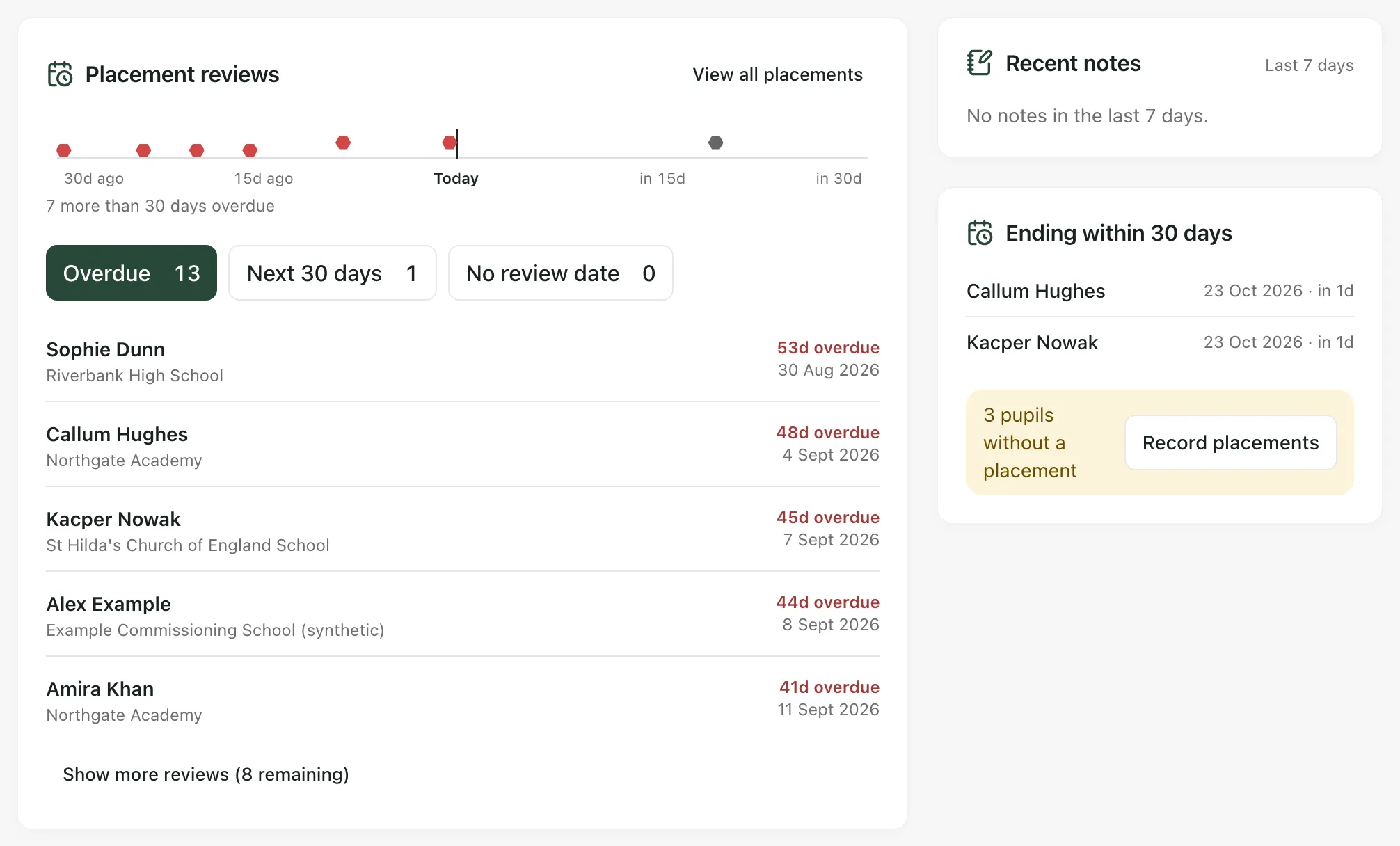
Placement reviews lists the live placements whose review is due. The strip at the top shows reviews from 30 days ago to 30 days ahead. Click a dot to see that placement.
- Choose a filter: Overdue, Next 30 days or No review date. The number on each shows how many placements it holds.
- Click a pupil’s name to open their record.
- If you manage the roll, click the pencil beside a placement to edit it, for example to set a new review date.
- Click Show more reviews to see the next five, or View all placements to open the full list.
Check notes and endings
Section titled “Check notes and endings”On the right:
- Recent notes shows the five latest notes from the last 7 days, with the pupil, the note category and when it was added. Notes marked Restricted are sensitive. Click a pupil’s name to open their notes.
- Ending within 30 days lists placements due to end in the next 30 days. If any pupils on roll have no placement, it also says how many. Click Record placements to add them.
- Your provision’s words: the labels on this page use your provision’s Setting profile. The defaults are pupil, group and commissioning school, with Provision Lead for the head of the provision. If your provision uses other words, such as learner, the buttons and headings change to match.
- The AP menu: the sidebar described here appears when your setting profile is alternative provision and AP operations are active. It only shows the pages you can open, so yours may have fewer items.
- No pupils yet: if nobody is on roll, Today shows a prompt to add your pupils instead of the cards above.
- Registration check: if your provision isn’t recorded as a registered school, Today may show Review independent-school registration. It’s based on placement hours and types, which are only indicators. Read it alongside the DfE guidance it links to before you decide anything. Click Open compliance checklist to go to your compliance records.
- If you’re worried about a pupil: click Safeguarding and follow your provision’s safeguarding procedure. See Raise a safeguarding concern about a pupil.
If something doesn’t work
Section titled “If something doesn’t work”| What you see | What to do |
|---|---|
| “Today’s registers could not be loaded.” | Reload the page. If it keeps happening, open Daily Register from the Attendance menu to check the registers. |
| “Placements could not be loaded. Review totals are unavailable.” | Reload the page. Until it loads, the review counts on Today aren’t complete. |
| “The complete list of active learner records could not be verified. On-roll and placement coverage totals are unavailable.” | Reload the page. The on-roll count stays blank until the full list loads. |
| “The latest 500 placement records are loaded. Open Placements to review this list; complete review totals are unavailable.” | Your provision has more placement records than Today can load. Click View all placements to work from the full list. |
| “Recent notes could not be loaded” | Reload the page, or open the pupil’s record to read their notes. |