Understand your attendance analytics
Written for: Attendance leads, senior leaders and teachers.
The attendance analytics page shows attendance across your school or a group of pupils: the headline figures, how attendance is changing week by week, how it compares with national figures, and which groups and sessions are most affected. Use it to decide where to look more closely, then open the pupils behind a figure.
Open the page
Section titled “Open the page”In the sidebar, open Attendance and choose Analytics. The same page is also under Leadership: choose Teaching & pupils, then Attendance & CME.
Choose who and what you’re looking at
Section titled “Choose who and what you’re looking at”Every figure on the page uses the filters along the top. The number of pupils and the dates they cover are shown on the left.
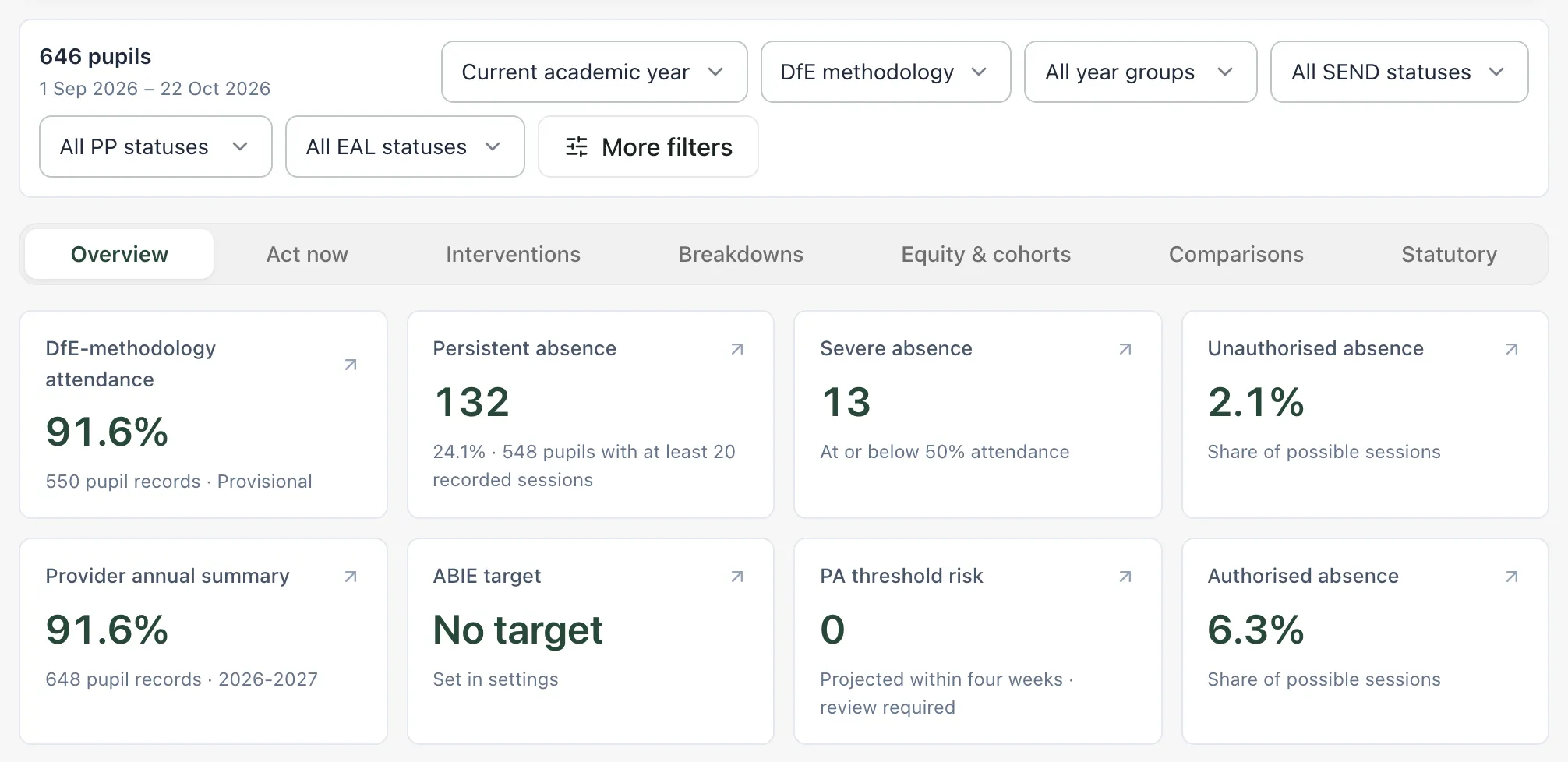
- Choose the dates: Current academic year, Current term, Last 30 days, Last term or Custom dates….
- Choose how attendance is counted:
- DfE methodology counts the pupils and sessions the DfE counts in its published attendance statistics. For example, Year 11 sessions stop being counted in late May.
- All recorded sessions counts every session recorded in Student Radar, including Reception and sixth form.
- Compulsory-age window counts only sessions while each pupil is of compulsory school age.
- Narrow the pupils with the year group, SEND, Pupil Premium and EAL lists.
- Click More filters for tutor groups, saved groups, other pupil characteristics, the comparison period and the Severely Absent Threshold. Click Done to close it.
To go back to everyone, click Clear cohorts.
Read the headline figures
Section titled “Read the headline figures”The Overview section opens first. Click a card to see the pupils behind it.
| Card | What it shows |
|---|---|
| DfE-methodology attendance | Attendance calculated with the DfE method, for the pupils it counts. Underneath, Provisional or Certified tells you whether your school’s figure has passed the checks needed to compare it nationally. |
| Persistent absence | Pupils who have missed 10% or more of their possible sessions (attendance of 90% or below), and what share of pupils that is. Only pupils with at least 20 recorded sessions are counted. |
| Severe absence | Pupils whose attendance is at or below the severe absence line: 50%, unless you change it under More filters. Again, only pupils with at least 20 recorded sessions are counted. |
| Unauthorised absence | Unauthorised absence as a share of all possible sessions. |
| Authorised absence | Authorised absence as a share of all possible sessions. |
| Provider annual summary | Attendance for all recorded sessions, from your MIS provider’s summary for the year. It’s a separate source from the DfE-methodology figure, so the two can differ. |
| ABIE target | Your school’s recorded ABIE target for the year. No target means none has been stored yet. |
| PA threshold risk | Pupils whose attendance is above 90% but who are projected to reach persistent absence within four weeks if their recent trend continues. |
When the page shows DfE methodology, its percentages follow the DfE method. Where a panel is labelled Not DfE-certified, its figures are counted directly from your recorded attendance marks instead, and aren’t compared with published DfE rates.
Click Methodology, coverage and comparison under the cards to see the session counts behind the headline figures and how they were worked out.
Tip: PA threshold risk is a projection from the pupil’s recent weekly attendance, not a certainty. Use it to decide who to look at first, alongside what you know about each pupil. See Spot pupils close to persistent absence.
See how attendance is changing
Section titled “See how attendance is changing”Further down the Overview section, Weekly Attendance Trend plots attendance for each week in the date range.
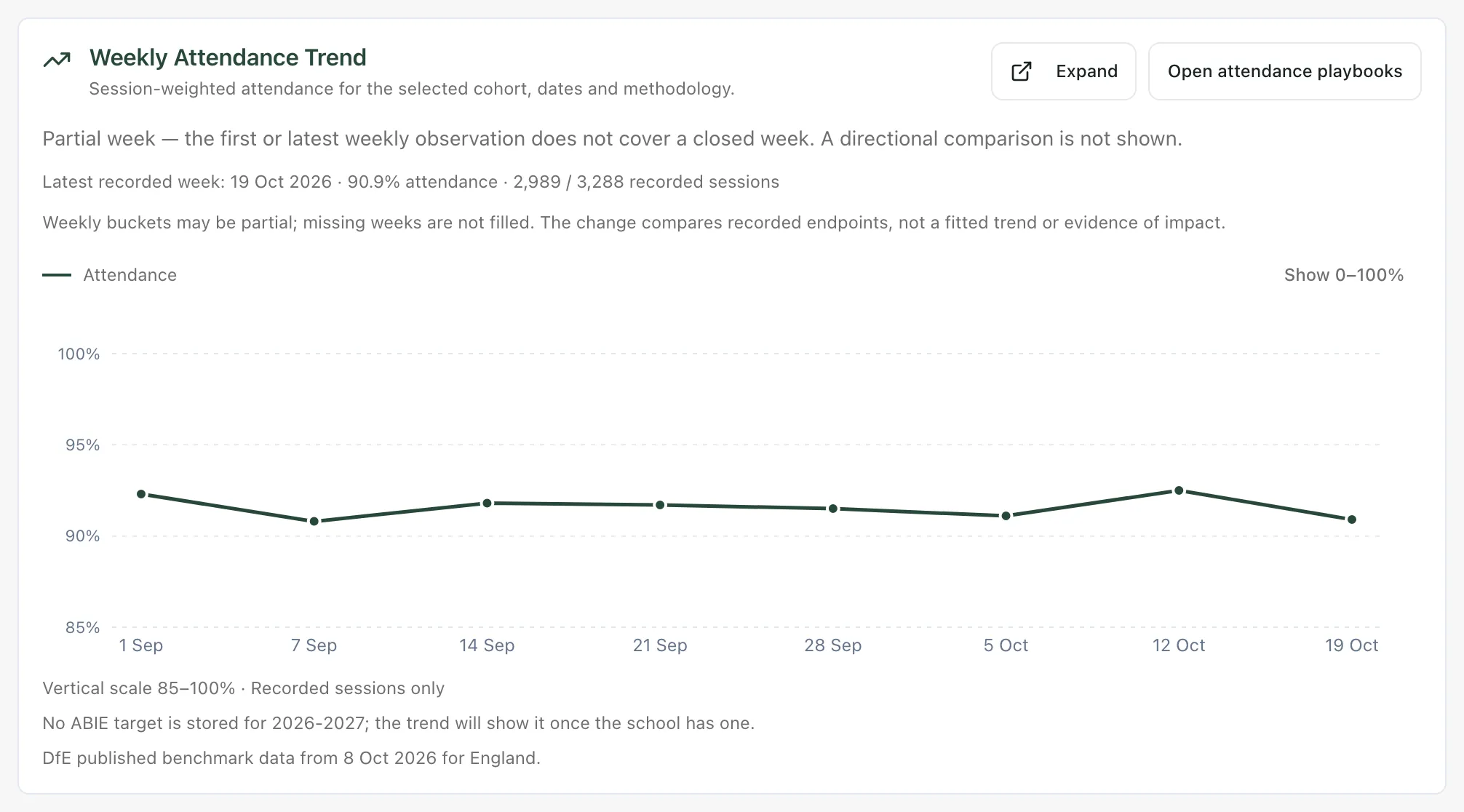
- Latest recorded week gives the most recent week’s attendance and the sessions behind it.
- A week can be partial, for example the current week. Missing weeks are left as gaps rather than filled in.
- The trend compares the first and last recorded weeks. It doesn’t show what caused a change.
- Click Show 0–100% to see the chart on a full scale.
- Click Expand to see the figures in a table, then Export PNG or Export CSV to download them.
Compare with national figures
Section titled “Compare with national figures”Benchmark comparison puts your school’s figure beside the DfE’s latest published figures for schools like yours, with the dates each figure covers.
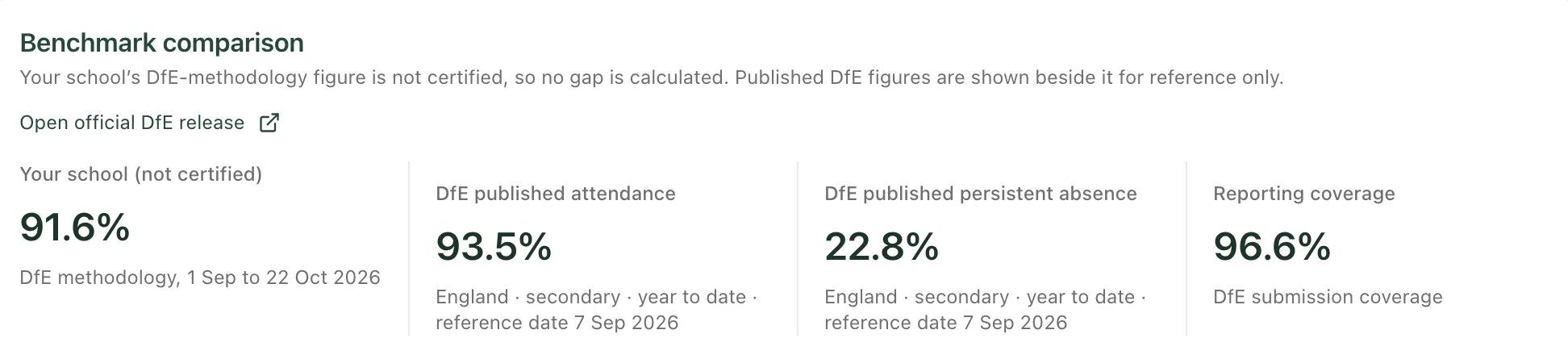
Student Radar only calculates a gap between your school and the national figure when your figure is Certified and covers the same period as the published one. Otherwise, the two figures are shown side by side for reference, and Why no gap is calculated lists what’s missing. Click Open official DfE release to see the source.
Explore the other sections
Section titled “Explore the other sections”Use the tabs under the filters to move between sections.
| Section | What you’ll find |
|---|---|
| Act now | Today’s absentees, pupils close to the persistent absence line, and pupils marked present at registration who have an unauthorised lesson absence the same day. |
| Interventions | How many pupils below 90% have had contact or a support plan recorded, and their attendance since. |
| Breakdowns | Absence by reason or by day of the week, Late to school and Late to lessons, the Attendance band distribution and the Session Absence Heatmap, which shows which mornings and afternoons have the most absence. |
| Equity & cohorts | Attendance by year group, by pupil group (such as FSM, PP and EAL) and by ethnicity. |
| Comparisons | Each pupil group’s attendance, persistent absence and unauthorised absence beside pupils outside that group. |
| Statutory | Counts of pupils on statutory registers and penalty notice cases, with links to the statutory views. |
Differences between groups show where to look. They don’t explain why a pattern exists. Groups with fewer than 5 pupils aren’t compared.
- Schools outside England: the Statutory section isn’t shown and no national DfE figures are loaded, because both are based on English law and English published data. Current term and Last term appear once your school’s term dates have been entered.
- Statutory registers: the statutory cohorts view is open only to staff such as senior leaders, safeguarding leads, SENCos, office managers and attendance officers.
- Tour: click Take a tour at the top of the page for a step-by-step guide. It opens each section as it explains it.
If something doesn’t work
Section titled “If something doesn’t work”| What you see | What to do |
|---|---|
| “At least 20 recorded sessions required” | None of the pupils in your selection has enough recorded sessions yet. Widen the dates or the pupil filters. |
| “Figure hidden until the attendance projection refreshes” | Student Radar is still updating the headline figure from new attendance marks. Check again later. |
| “Figure hidden because pupil source sessions are incomplete” | Some pupils’ attendance hasn’t fully arrived from your MIS, so the figure isn’t shown rather than being shown wrong. Check again later. |
| “Attendance for this selection is unavailable. No alternative calculation is being substituted.” | Click Try again. If it keeps happening, change the dates or filters, or try again later. |
| “DfE-methodology or MIS-reported attendance is currently unavailable. No alternative calculation is being substituted.” | The DfE-methodology figures couldn’t be loaded. Other figures on the page are still shown. Try again later. |
| “Unable to load weekly session totals. Try again shortly.” | The weekly trend couldn’t be loaded. Reload the page after a minute. |
| “No recorded weekly sessions are available for this cohort and date window.” | There are no attendance marks for these pupils and dates. Check the dates and filters. |
| “Statutory summary unavailable. The counts could not be loaded; this does not mean the registers are empty.” | Click Retry statutory summary. If it keeps happening, your account may not have access to statutory registers. Ask your attendance lead. |