Get help or tell someone you're worried
Written for: Pupils.
If something is worrying you, you don’t have to deal with it on your own. Whatever it is, you can always talk to an adult you trust at school. Some schools also have a Worry Box in Student Radar, where you can write down what’s worrying you and send it to a trusted adult.
If you’re in danger right now
Section titled “If you’re in danger right now”Tell an adult straight away. Don’t wait, and don’t use the Worry Box for this.
If you’re in danger right now and there’s no adult with you, call 999.
Talk to someone at school
Section titled “Talk to someone at school”Talking to someone is always OK. You could talk to your teacher, or another adult at school you trust. If that person isn’t there, ask another adult.
To see this in Student Radar, click Help in the menu. On a phone or tablet, Help is at the bottom of the screen.
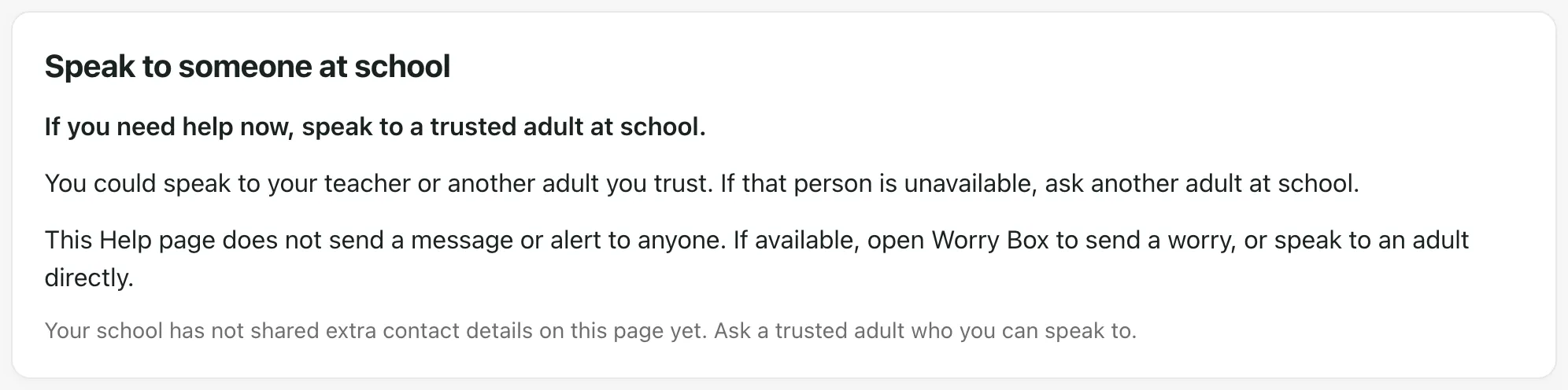
The Help page doesn’t send a message to anyone. It says “This Help page does not send a message or alert to anyone.” So if you need help, speak to an adult or use the Worry Box.
Use the Worry Box
Section titled “Use the Worry Box”Not every school uses the Worry Box. If yours does, the Worry Box card on the Help page has an Open Worry Box button. Opening it doesn’t send anything.
The Worry Box isn’t for emergencies, and a reply might not come straight away. If you need help now, speak to an adult.
You don’t have to say who you are. Whatever it is, it’s not your fault.
- On the Help page, click Open Worry Box. You’ll see Tell us what’s worrying you.
- Under What is it about?, you can choose Bullying, A friend, Something at home, Something online or Something else. You don’t have to choose one.
- In Tell us more, write what’s worrying you. Write as much or as little as you like.
- If you’d like an adult to talk to you about it, write your name and class under Want someone to talk to you? If you’d rather not say who you are, leave it empty.
- You might be asked to do a quick check before you send. Follow what it says on the screen.
- Click Send to a trusted adult.
You’ll see Thank you for telling us, and Your reference, which is a short code. You can keep the code if you want to talk about your worry later.
Say it out loud
Section titled “Say it out loud”On some devices, you can talk instead of typing.
- Click Say it out loud. If your device asks, allow the microphone.
- Say what’s worrying you.
- Click Stop & add. Your words are turned into writing in the Tell us more box.
Check the writing before you send it. You can change it if you need to.
Help at the bottom of the page
Section titled “Help at the bottom of the page”At the bottom of the Worry Box page, it says In danger right now? Call 999. It also gives the number for Childline, which you can call for free, day or night.
Tell an adult how your targets are going
Section titled “Tell an adult how your targets are going”The Help page also has Feedback about your targets. This is for telling adults how your targets are going, not for worries. Click Open my targets to go there. See Check your targets and give feedback.
If something doesn’t work
Section titled “If something doesn’t work”Whatever you see, you can always talk to an adult you trust at school.
| What you see | What to do |
|---|---|
| “We could not check the Worry Box right now. Speak to a trusted adult at school.” | Click Check Worry Box again. If it still doesn’t work, talk to an adult you trust. |
| “Your school’s Worry Box is not available here. Speak to a trusted adult at school.” | Your school doesn’t have a Worry Box here. Talk to an adult you trust. |
| “This link isn’t working” | Ask a teacher or another adult you trust for the right link, or tell them what’s worrying you. |
| “Worry box unavailable” | Click Retry worry box. If it still doesn’t work, talk to an adult you trust. |
| “Please write a little more so an adult can understand (at least 10 characters).” | Write a few more words in Tell us more. |
| “Complete the verification check before sending.” | Do the quick check on the page, then click Send to a trusted adult. |
| “To talk instead of typing, allow the microphone when your browser asks.” | Allow the microphone, or type your worry instead. |
| “Your original worry has not been confirmed. Your words are still here.” | Keep the page open and click Confirm original submission. If that doesn’t work, talk to an adult you trust. |