Review AP retention schedules and plan subject access
Read the relevant retention category or prepare the subject-access request context, then follow the toolkit into the authorised source tools. This page stores nothing, deletes nothing and does not display a universal audit-event log. It opens the existing authorised tools for records, exports, safeguarding holds and evidence.
Before you begin
Section titled “Before you begin”Open Compliance → Audit and Retention in your alternative provision workspace. The AP setting has its own schedule and subject-access route; a non-AP school may open a different task/document workspace at the same route. Page access does not grant access to every record or export.
Work with your provision’s data protection lead and approved retention/disclosure policy. The page presents recommendations and the application’s current handling; your organisation confirms its own decisions. Do not interpret an elapsed period as permission to delete records or a calculated date as a complete legal assessment.
1. Read a retention category
Section titled “1. Read a retention category”- Open Retention schedule. On a phone use Audit and retention sections.
- Find the record type, such as Learner record, Referrals, Family messages, Single central record or Invoices and billing.
- Read Covers to check whether your material actually falls in that category.
- Read the displayed period together with Period starts. A duration without its starting event can give the wrong disposal-review date.
- Read What happens, Audit trail, Record export and Basis. Retention recommendations, enforced handling, recorded events and export coverage are distinct facts.
- Choose Open [workspace] where offered to inspect the authorised source. If that button is absent, ask the record owner rather than assuming the source does not exist.
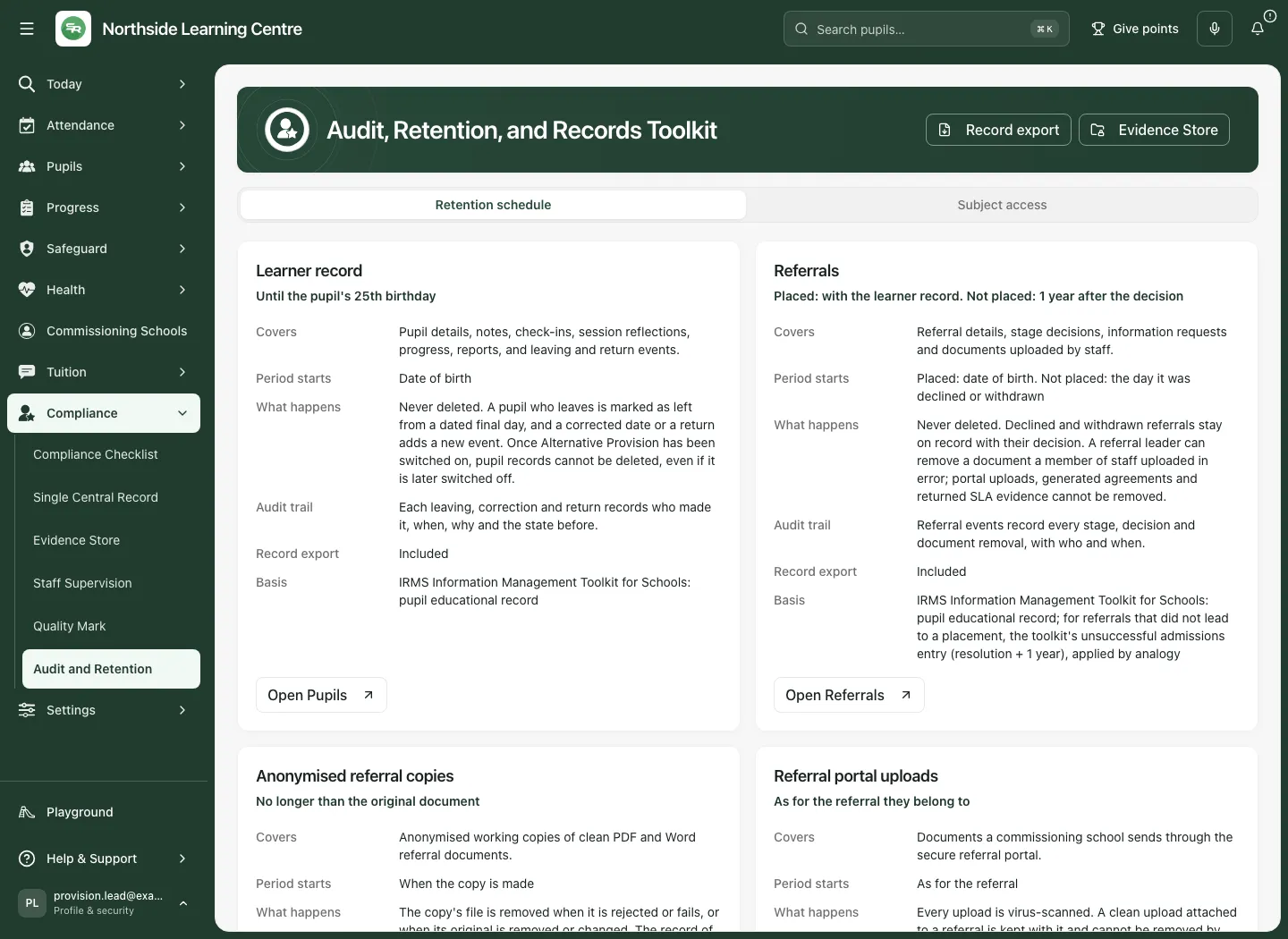
The schedule currently has seventeen categories. It is a guide to those sources, not an assertion that every type of record held by your organisation is covered.
2. Review a period without deleting anything
Section titled “2. Review a period without deleting anything”- Read About these periods at the end of the schedule.
- Confirm the period and its start event against your approved policy and any applicable hold or continuing need.
- Review the actual source record and its history. A pupil leaving is a dated lifecycle event; it does not delete their record. Corrections and returns preserve their own event history.
- Record the authorised disposal-review decision and rationale in Evidence Store, using appropriate confidentiality.
- Where disposal is agreed, use the approved support process. Nothing on this toolkit page deletes a record; it has no disposal button.
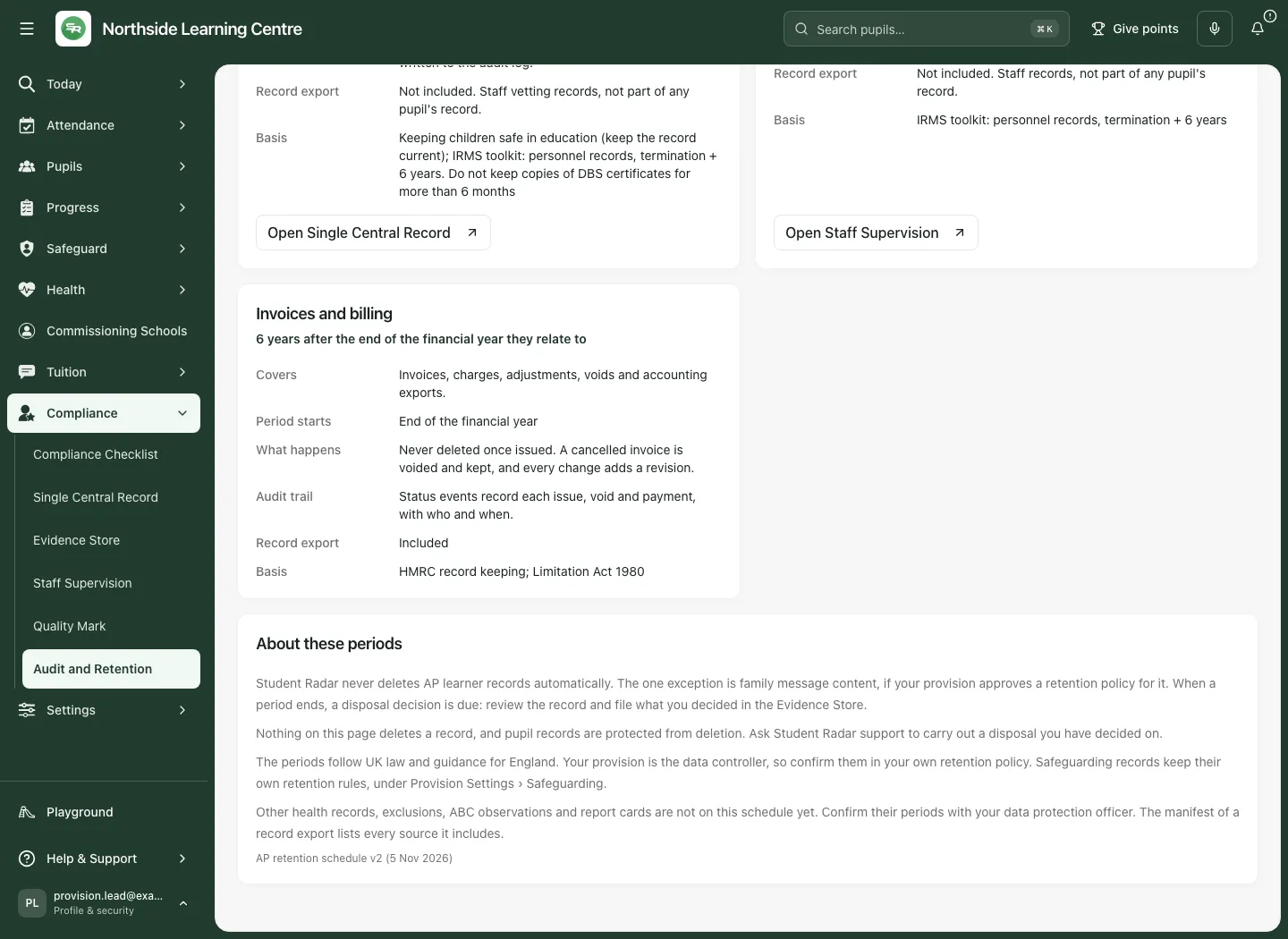
The page states that AP learner records are not automatically deleted. The exception described is family-message content under a retention policy approved by the provision, with its separate hold/process boundaries. Other health records, exclusions, ABC observations and report cards are not on this schedule yet: confirm their treatment with the data protection lead. Safeguarding records have separate rules under Provision Settings → Safeguarding.
3. Prepare the subject-access request context
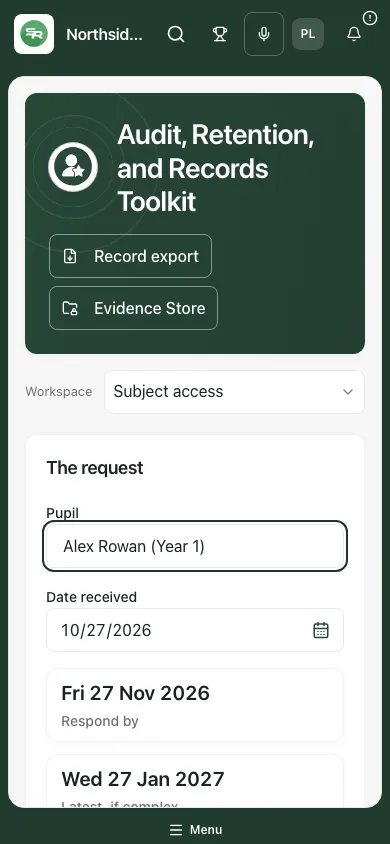
Section titled “3. Prepare the subject-access request context”- Choose Subject access.
- In The request, type into Pupil and choose the exact offered name. Matching names/year groups include an ID to distinguish them. A partial unmatched name does not select a child.
- Check Pupil ID in the export before using it to find records. If the chosen pupil disappears from the available list, nobody is selected; the page does not silently choose a namesake.
- Enter Date received. Future dates are refused and do not produce a response deadline.
- Read Respond by and Latest, if complex with the explanatory note. The calculator uses calendar months and moves weekend results to the next weekday; it does not know bank holidays. Confirm the actual response timetable and any extension with the responsible lead.
- Use Open pupil record if offered and appropriate. Each source still checks access.
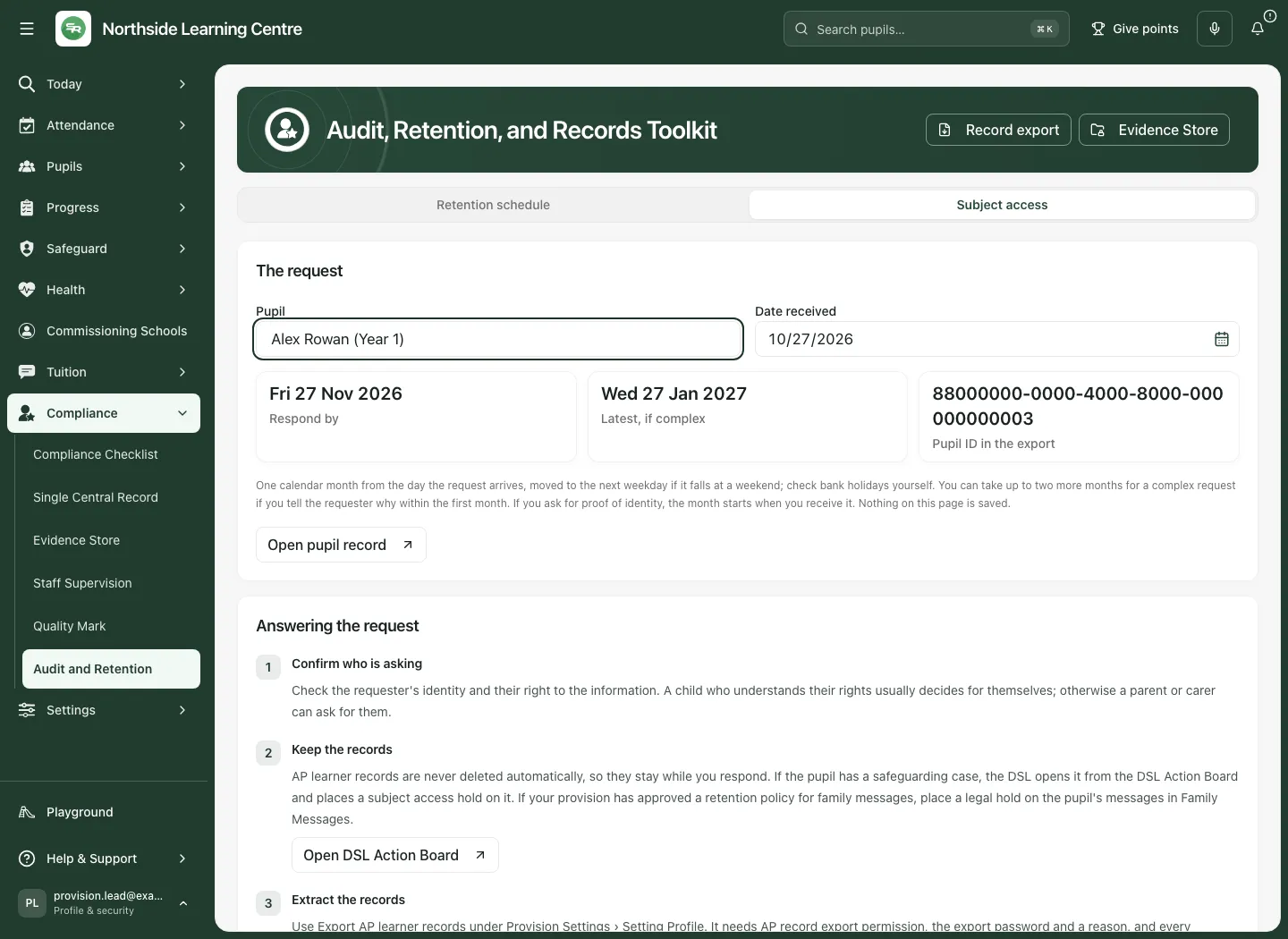
The page describes a one-month response calculation and a possible additional two months for complexity, with notice to the requester within the first month. It also explains that where proof of identity is needed, the period starts when that proof is received. Apply your organisation’s assessed circumstances rather than treating the displayed extended date as automatic permission to delay.
Nothing on this page is saved. Switching between its two sections keeps the current inputs during the visit, but reloading resets them. Record the request, accountable person and dates in your approved case/task process; this calculator does not create a case, task or reminder.
4. Follow the five response steps
Section titled “4. Follow the five response steps”- Confirm who is asking. Check identity and their right to the information. Use the authorised process for a child or someone acting for them.
- Keep the records. Where a safeguarding case exists, the DSL uses Open DSL Action Board, opens the actual case and places the appropriate subject-access hold there. Where an approved family-message retention policy applies, use the separate Family Messages legal-hold process. This page does not place either hold.
- Extract the records. Use Open record export or the banner’s Record export where offered. This opens Provision Settings → Setting Profile → Export AP learner records. The source tool requires AP record-export permission, the export password and a reason, and records the extraction. Review its confirmation and manifest; do not assume opening the destination created an export.
- Review before you disclose. Use the data protection lead’s review to identify other people’s information, relevant exemptions and any potential harm. The commissioning school holds and answers for its own records.
- Respond and keep a record. Use your approved secure response method, then Open Evidence Store and file what was disclosed and when as a confidential document. A stored record of disclosure is not proof of delivery or receipt.
5. Check the export boundary
Section titled “5. Check the export boundary”The record export extracts the whole provision, not just the pupil typed into this calculator. Use the selected pupil ID to locate that pupil’s records in the exported sources. A referral that never became a placement may have no pupil ID, so review the referrals files by the child’s name using the approved process.
You need access to each pupil and each record type being extracted. The export manifest identifies missing sources; an incomplete extraction is not a complete response. The schedule’s Record export line explains which categories are included. Staff vetting and supervision are staff records, not part of a pupil’s record export; working anonymised referral copies are not the original referral documents.
Do not send a whole-provision export to a requester. Review and prepare the authorised disclosure from its relevant records, including appropriate redaction and the secure response process.
6. Use it on a phone
Section titled “6. Use it on a phone”- Choose Subject access from Audit and retention sections.
- Enter/check the same pupil and received date, then read the response dates.
- Scroll to Answering the request to review each source route. Check the request identity before opening a source.
- Keep the durable request record in your approved workflow; leaving or reloading this page does not save the inputs.
Schedule reference
Section titled “Schedule reference”Read the full card before using a period: its handling, audit and export notes are part of the meaning. These are the periods displayed by AP retention schedule v2 (5 Nov 2026), subject to your provision’s approved policy and assessed circumstances.
| Category | Displayed period and starting event |
|---|---|
| Learner record | Until the pupil’s 25th birthday; from date of birth |
| Referrals | Placed: with learner record, from date of birth. Not placed: one year after declined/withdrawn decision |
| Anonymised referral copies | No longer than original document; from when the copy is made |
| Referral portal uploads | As for their referral |
| Placements | With learner record until 25th birthday; from date of birth |
| Attendance | At least six years from each entry, and with learner record |
| Risk assessments | With learner record until 25th birthday; from date of birth |
| Physical interventions | With learner record until 25th birthday; from date of birth |
| Consent records | With learner record until 25th birthday; from date of birth |
| Behaviour incidents | With learner record until 25th birthday; from date of birth |
| Family messages | With learner record until 25th birthday; from date of birth, with the separately approved content-policy exception |
| Accreditations | With learner record until 25th birthday; from date of birth |
| Careers and destinations | With learner record until 25th birthday; from date of birth |
| Transport | With learner record until 25th birthday; from date of birth |
| Single central record | While working with you, then six years after leaving; from leaving date |
| Staff supervision | While working with you, then six years after leaving; from leaving date |
| Invoices and billing | Six years after the relevant financial year ends |
Troubleshooting and questions
Section titled “Troubleshooting and questions”- No export or source button: your access may not permit that destination or export duty. Ask the permission manager for the specific authorised task.
- No matching pupil: choose a whole offered label. Leavers are not listed here; find them by name in the students export file, which includes their ID. Do not choose a namesake.
- Deadline blank: check that the received date is valid and not in the future.
- Dates disappeared after reload: expected; this page saves nothing. Use your approved durable request record.
- A category is absent: this schedule is not exhaustive. Ask the data protection lead and source owner.
- A period ended: a disposal-review decision is due; no deletion happens from this page.
Is this the full audit trail? No. The schedule describes the audit maintained by each source. Open that source to inspect the actual permitted history.
Does entering a date place a hold or send a response? No. Holds, extraction, disclosure and evidence recording are separate authorised actions in their owning workflows.
Does an export guarantee a complete subject-access response? No. Check the manifest, scope, omissions and disclosure review; other organisations may hold separate records.
Related: AP Evidence Store, AP single central record, AP staff supervision.