Review accident investigations and corrective actions
Written for: Authorised accident investigators, health leads and sign-off staff.
Open the investigation connected to the First Aid incident, review evidence and record corrective actions before authorised sign-off. The investigation stays connected to its First Aid incident. A recorded accident, a suggested investigation, completed actions and a signed-off investigation are different facts.
Use the school’s actual investigation and reporting process. The app records evidence and human decisions; it does not establish a cause, decide reportability or prove that an action prevented another incident. You need access to the incident and the relevant investigation action. Managing an investigation and signing it off can require different permissions.
The screenshots use fictional school records, Charlie Bucket, Sam Patel and Jo Ellis. They illustrate a saved investigation draft with an open corrective action; no real accident, sign-off or external report is involved.
Choose the right investigation queue
Section titled “Choose the right investigation queue”- Open Accident Investigations. The current application route is
/v/first-aid-investigations. - Choose Needs review for suggestions awaiting a human decision, Open for ongoing investigations, Actions due for open corrective work, Awaiting sign-off for completed investigations, or History for retained past decisions.
- Read the summary counts with their labels. Overdue actions is not the same as every item in Actions due: the latter also includes upcoming action dates.
- Use Search pupil, incident or location, Filter by severity, Filter by investigator, From date and To date to find the relevant record. The date range is bounded; correct an invalid or overlong range rather than interpreting its error as no investigations.
- In History, use Filter by status to distinguish signed-off and dismissed records. Suggestions have no investigator yet, so an investigator filter does not assign one to them.
- Check the incident number, person, event date/location, investigator, state and action counts before opening a row. The register also supports staff and visitor/contractor incidents; do not assume every named person is a pupil.
- Use the register’s paging controls for more records. A failed register or summary read is unavailable information, not a zero workload.
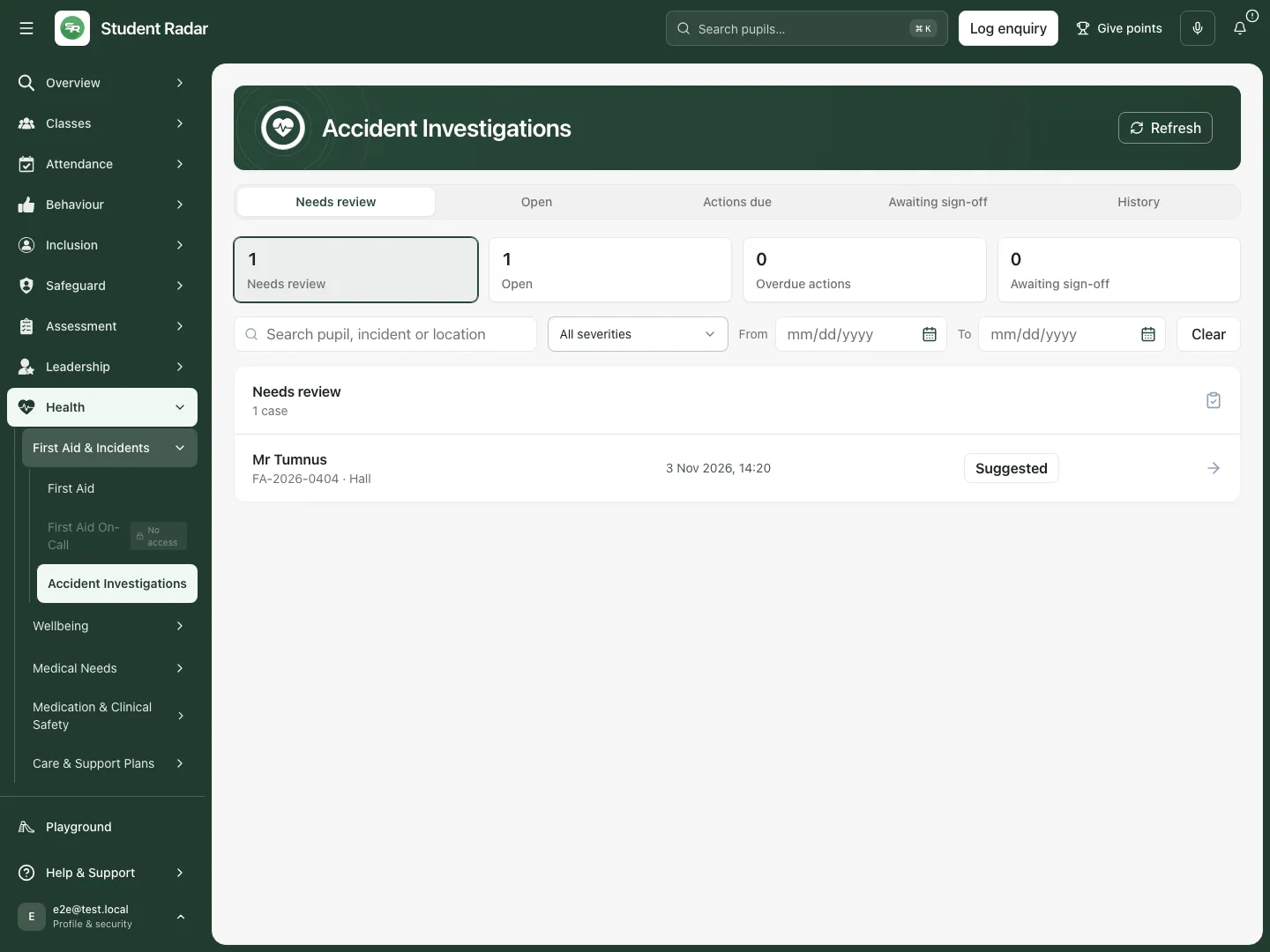 The fictional Needs review queue contains a suggested staff-incident investigation. A suggestion has not been opened or assigned as an investigation.
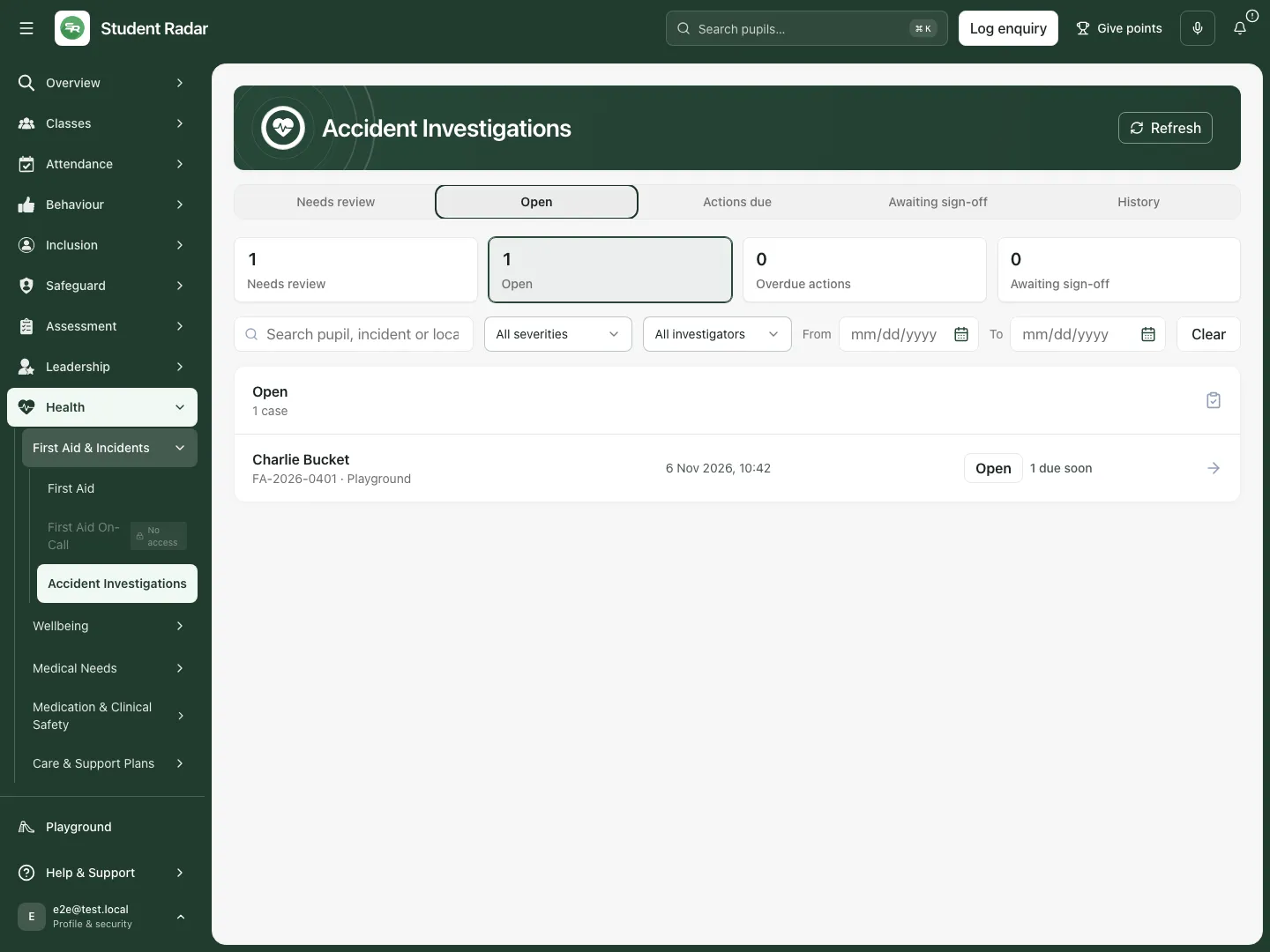 The fictional Open queue identifies Charlie’s investigation, Sam as investigator and the corrective action due on 9 November.
Decide whether to open a suggestion
Section titled “Decide whether to open a suggestion”- Open the suggested incident row. The incident opens in First Aid with the investigation panel selected, so its original facts remain available.
- Review the recorded incident and the reason it was suggested. Seriousness or a reporting-review flag can prompt a suggestion; the suggestion itself does not decide what happened or change an HSE decision.
- Choose Open investigation when an investigation should proceed. Check the resulting state and investigator before entering findings.
- If a suggestion should not proceed, enter Reason for dismissing and choose Dismiss suggestion. Use a meaningful explanation, then check the retained state/history. Dismissing a suggestion is not deleting the incident.
- If the record is read-only or the action is refused, check your current incident access and role. Do not substitute an unrelated incident merely to obtain an editable panel.
Record facts, causes and learning separately
Section titled “Record facts, causes and learning separately”- In an open investigation, enter Established facts from the evidence reviewed. Keep unverified statements and uncertainty identifiable.
- Enter Recorded causes as the investigator’s supported findings. If a cause is not yet established, say so rather than inventing certainty.
- Enter Lessons learned with the practical learning or proposed changes.
- Choose the relevant Contributing factors: environment/premises, equipment/materials, supervision, procedure/risk assessment, training/competence, communication, workload/staffing, individual circumstances or Other. These record the reviewed interpretation; they are not automatically assigned causes.
- Choose Save draft to save the current answers while retaining an open investigation. Reopen the incident/investigation and check the wording that saved.
- If a save fails or the saved state changed elsewhere, keep the draft, refresh and reconcile the newer record before trying again. Leaving unsaved investigation answers offers a discard/stay decision; saving a draft does not complete or sign off the review.
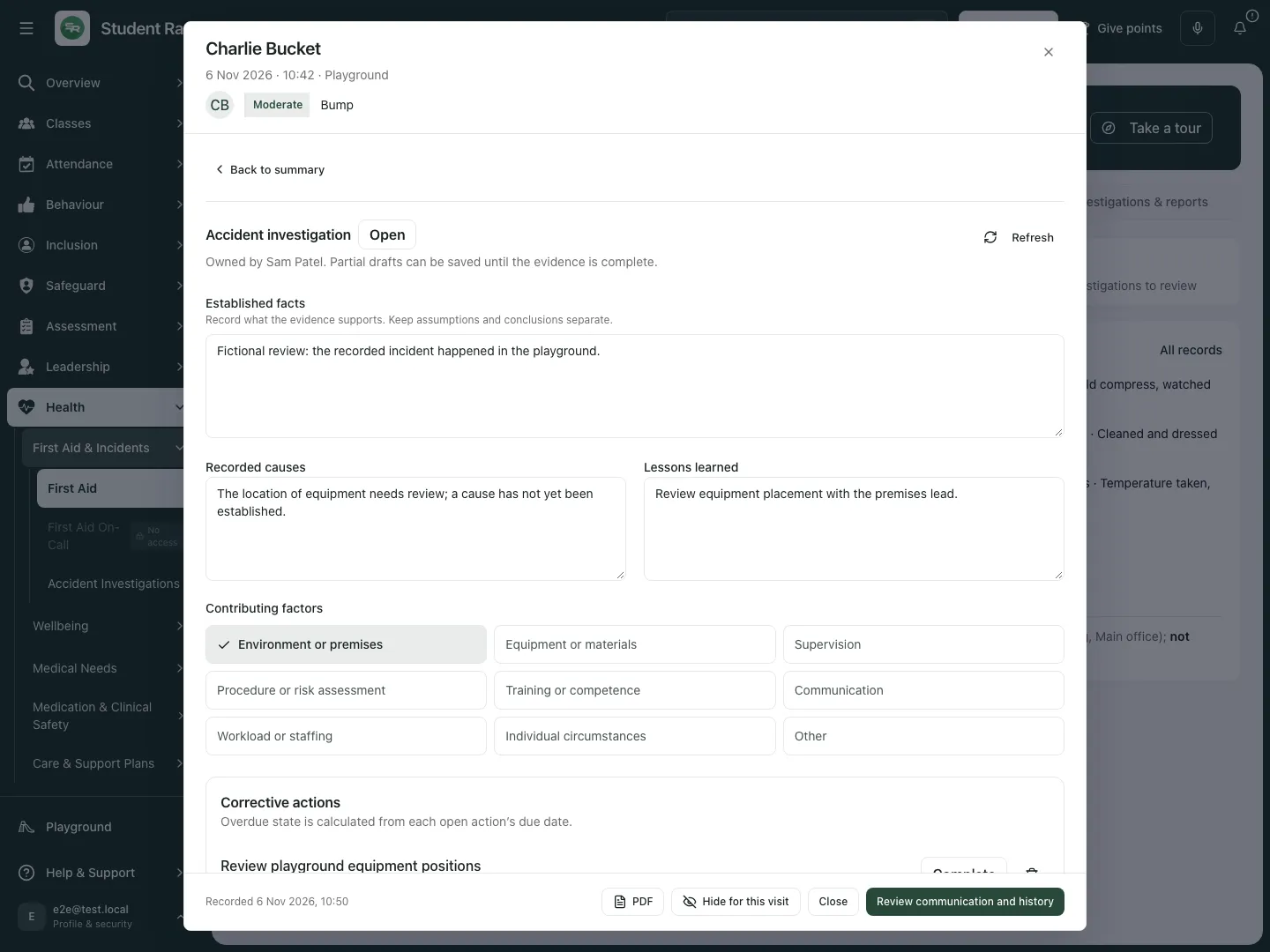 The fictional investigation separates established facts, an unresolved cause, lessons and the open corrective action.
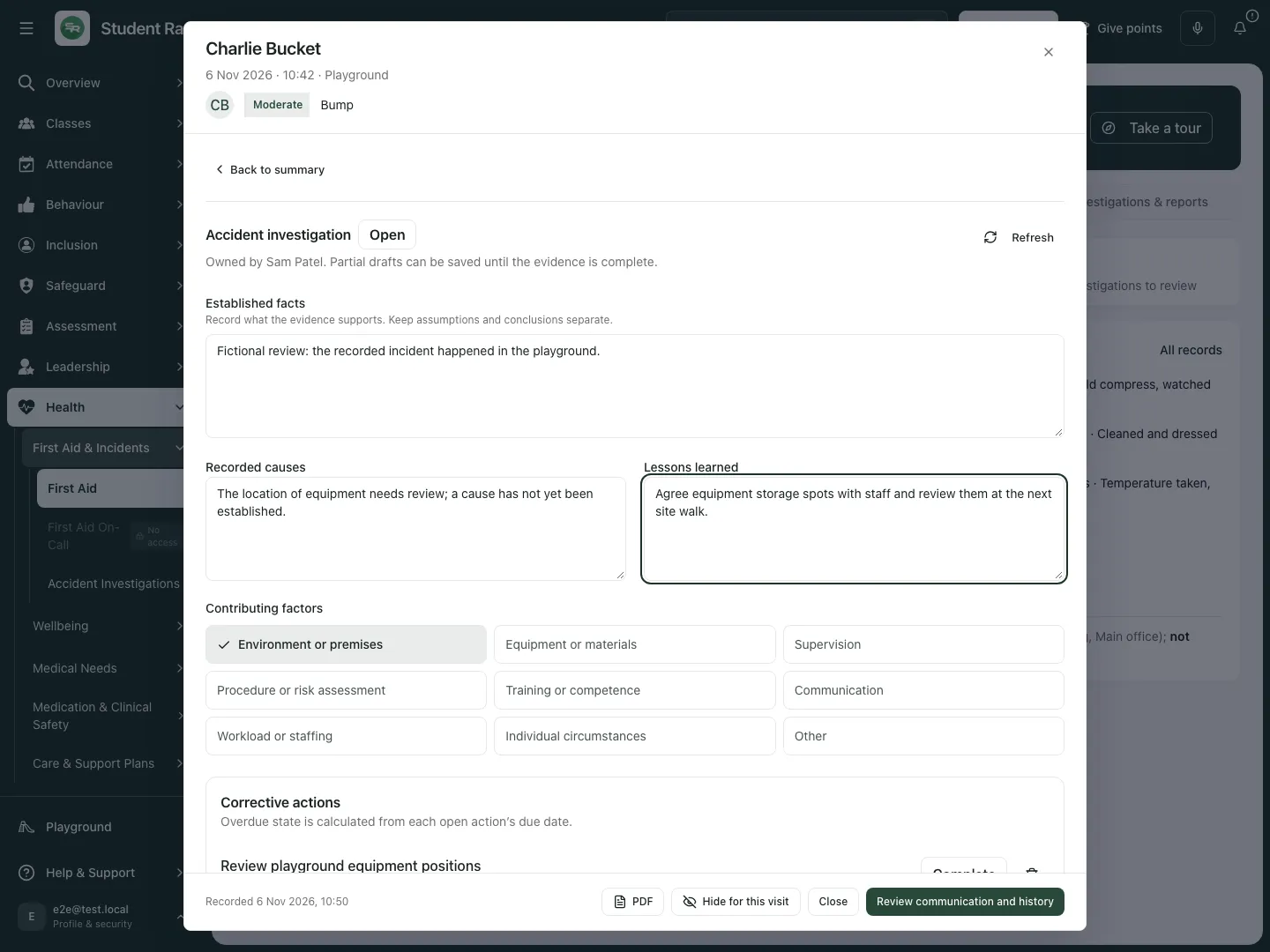 The fictional Lessons learned edit proposes agreed equipment-storage spots. It does not claim that an action has already been completed or proved effective.
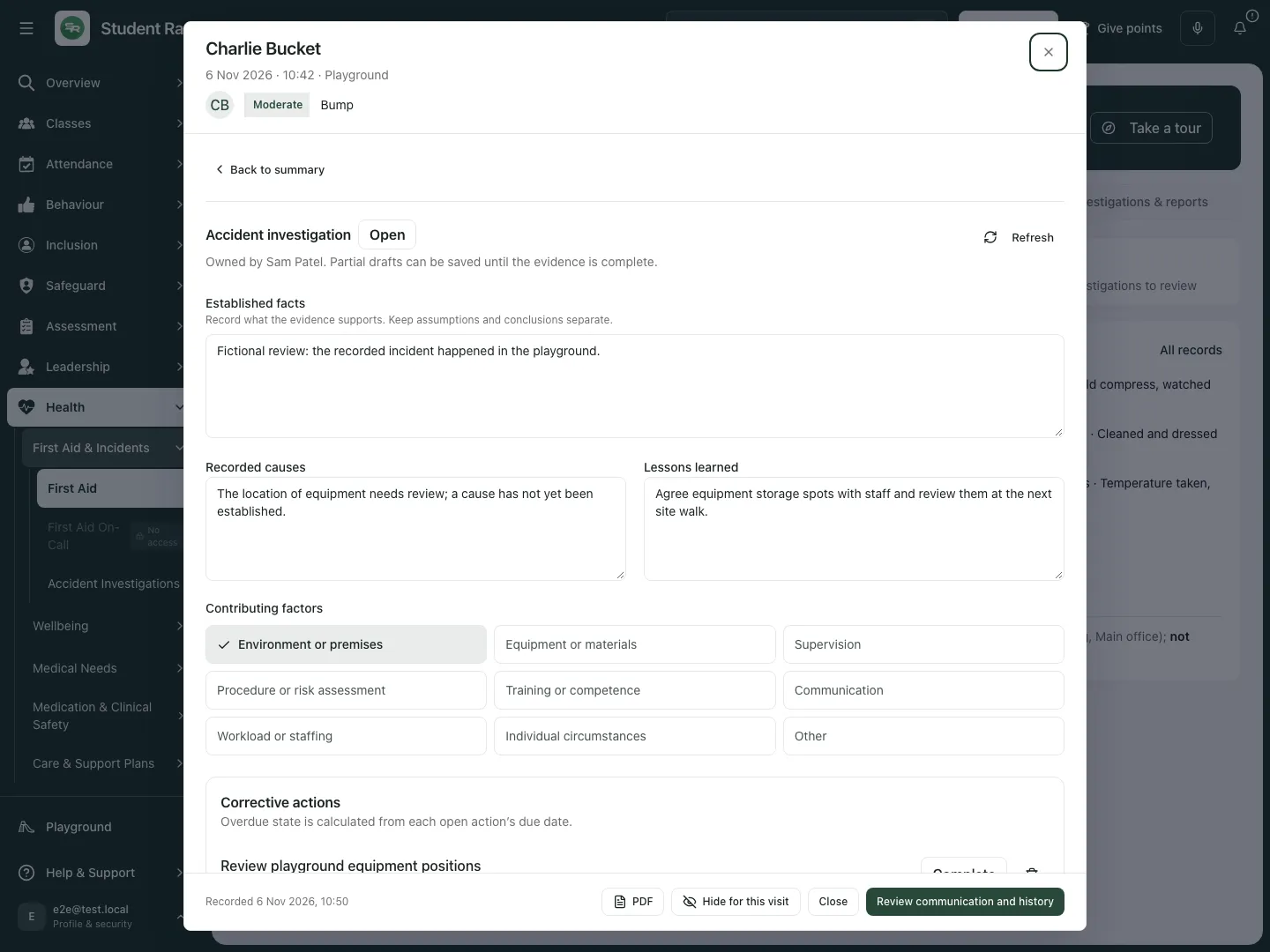 The reopened fictional investigation retains the saved learning while the corrective action remains open and completion is still outstanding.
Add and manage corrective actions
Section titled “Add and manage corrective actions”- Under Corrective actions, enter Action required, Action owner and Action due date, then choose Add. Check the named owner and actual due date before saving.
- Read the saved action’s state and date. Overdue is calculated from an open action’s due date on the school’s date; an upcoming due action is not already overdue.
- Choose Complete beside the particular action only when its work actually happened. An investigation-level Complete button is a different action.
- If an action is no longer appropriate, use its cancellation control, enter Why is this action being cancelled? and choose Cancel action, or Keep action to leave it open. A cancelled action is not completed work.
- Check each action after refresh. Corrective-action changes preserve the investigation’s draft answers while its current context reloads.
- If all proposed actions were cancelled and none remains as actual work, explain Why no corrective action is needed. Cancellation alone cannot stand in for that rationale.
The saved example has one open action. Its future due date is preserved, and no completion or cancellation is recorded in these screenshots.
Review witness evidence and gaps
Section titled “Review witness evidence and gaps”- Expand Reviewed witness evidence and read the attributed account, witness name/role, source and review date.
- Distinguish a reviewed account from an outstanding witness request or an account awaiting review. The panel reports those gaps separately.
- Return to the incident’s witness workflow to collect or review the source account. Do not copy a pending account into established facts as though it had already been reviewed.
- Keep the witness’s words separate from the investigator’s interpretation and recorded causes. A reviewed account is evidence to consider, not automatic proof of a cause.
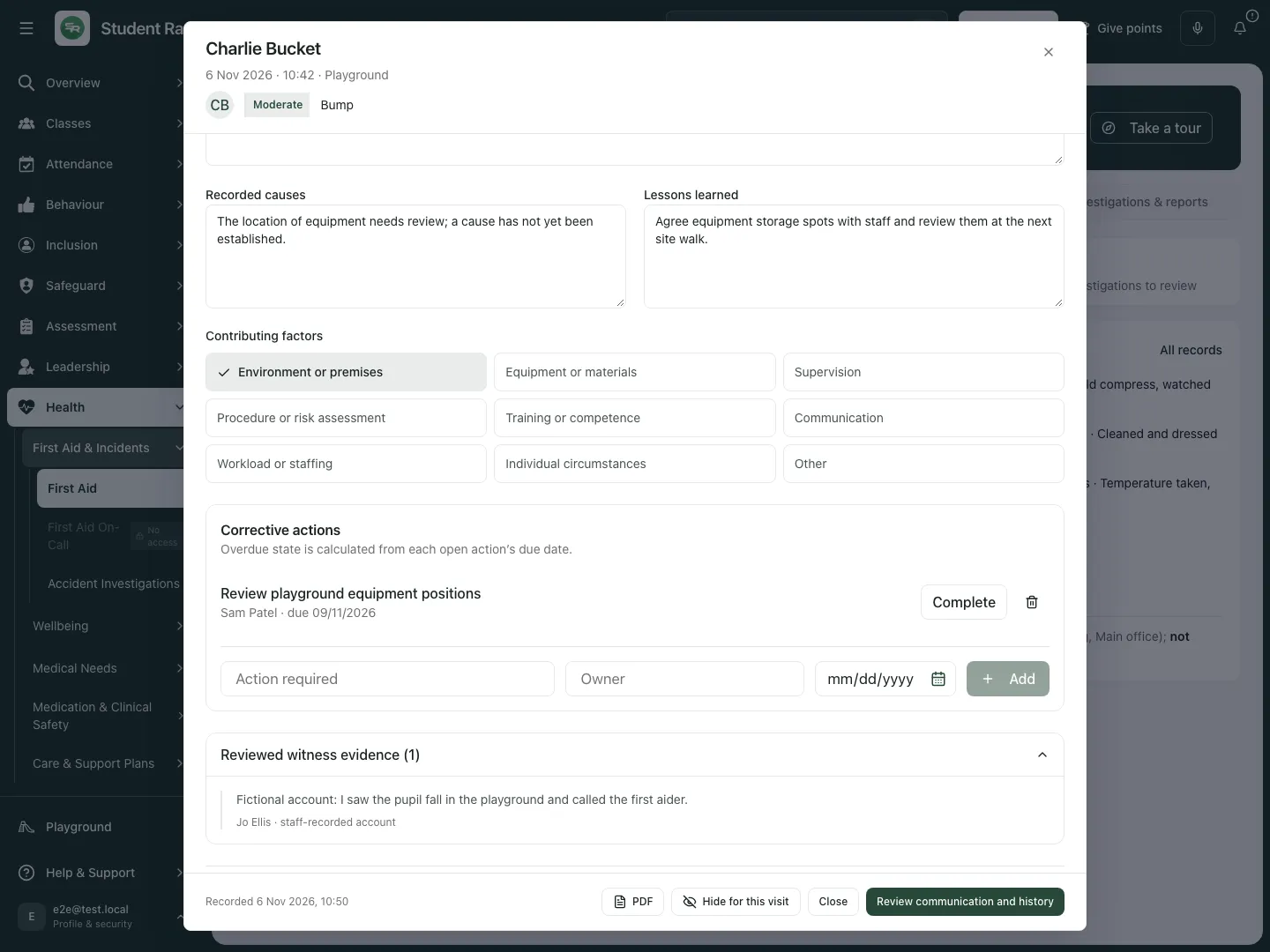 The fictional panel shows Jo Ellis’s attributed, reviewed account beside the investigation. There are no pending witness accounts or requests in this example.
Complete the investigation, then obtain sign-off
Section titled “Complete the investigation, then obtain sign-off”- Review the Before completing list. Established facts, recorded causes and lessons need meaningful answers.
- Complete or cancel every open corrective action. Retain at least the actual non-cancelled action outcome, or give the no-action rationale when no corrective action was needed.
- Check witness gaps and the original incident/reporting context before making the completion decision.
- Choose the investigation’s Complete button. It saves the current answers and changes the investigation to completed; it does not sign it off automatically.
- An authorised sign-off user reviews the completed record and chooses Sign off. Check the recorded sign-off person/time. Someone who can edit an investigation may still lack sign-off authority.
- The completed review appears in Awaiting sign-off until signed off. A signed-off record retains its actions, evidence and earlier history; a completion tick alone is not evidence that the intervention prevented harm.
Reopen a signed-off investigation deliberately
Section titled “Reopen a signed-off investigation deliberately”- Open the signed-off investigation and review the reason a further review is needed.
- When permitted, enter Reason for reopening and choose Reopen.
- Check the resulting open state and the recorded reopening reason. Earlier sign-off remains in the audit history; reopening does not erase it.
- Review the findings and actions again before completing and obtaining a fresh authorised sign-off.
The fictional example remains an open saved draft.
Work from Actions due and incident exports
Section titled “Work from Actions due and incident exports”- Choose Actions due to review overdue and near-term open actions. Read the actual date and owner rather than using only the summary count.
- Open the incident row to complete, cancel or review the action in context.
- From the First Aid incident, PDF prepares the permitted record with its relevant evidence context. Check source coverage and any unavailable witness/investigation information before treating the export as complete.
- Use First Aid’s Records and Investigations & reports sections to move back to the wider incident workflow. Parent communication and HSE reporting remain separate authorised actions.
 The fictional due-action queue includes the approaching 9 November action even though the overdue-action count is zero.
Phone use
Section titled “Phone use”Use the queue selector and compact incident rows. Check person, incident number, state and action date before opening the investigation. Scroll the saved findings and actions and check the save state before leaving the record.
 The fictional phone queue retains the incident and due-action context.
Problems and questions
Section titled “Problems and questions”The investigation is missing. Check queue, search, date range, severity, investigator and incident access. A suggestion has no investigator until opened.
Counts are unavailable. Retry the summary/register. Do not report unavailable as zero or reuse a stale count as current.
Complete is disabled. Read Before completing. Finish/cancel open actions and provide the required facts, causes, learning and any no-action explanation.
All actions were cancelled but completion is still blocked. Cancelled work is not work carried out. Explain why no corrective action was needed instead of relying on cancelled rows.
The record is completed but I cannot sign off. Sign-off is a separate permission/action. Ask the authorised sign-off colleague to review the completed investigation.
A stale transition was refused. Refresh and check whether someone already completed, signed off or reopened it. Do not repeat the transition against an old state.
Does an investigation suggestion change reporting status? No. It asks a human to review whether an investigation is needed; it does not make or submit an HSE reporting decision.
Related: First Aid, First Aid On-Call.